> ## Documentation Index
> Fetch the complete documentation index at: https://arize-ax.mintlify.site/docs/llms.txt
> Use this file to discover all available pages before exploring further.
# Instrument LangChain agents
> Trace agents built with LangChain and LangGraph in Arize AX using OpenInference, in Python or TypeScript, with tool spans and sessions.
[LangChain](https://docs.langchain.com/) is an open-source framework for building LLM applications and agents, available in Python and TypeScript, with [LangGraph](https://docs.langchain.com/oss/python/langgraph/overview) as its low-level orchestration framework and runtime for agents. Learn how to instrument LangChain agents to capture every agent run, model call, and tool call so you can observe, evaluate, and improve quality. This guide attaches the OpenInference instrumentor for LangChain to a LangChain/LangGraph agent to send traces to Arize AX.
Every agent run, model call, and tool call is captured as a structured trace without changing your agent logic. The same instrumentor covers the underlying LangChain primitives, so LangGraph agents, LCEL chains, and legacy `AgentExecutor` agents are all traced by one setup.
## Overview
In this guide you will instrument a LangChain agent, run it, and read the resulting traces in Arize AX. The following steps apply to any app built on LangChain, whether it runs behind a web framework such as FastAPI or Express, in a background worker, or as a script.
This guide assumes familiarity with:
* Python or TypeScript, including `async`/`await`
* Building an agent with LangChain's `create_agent` and tools
* Environment variables and package installation
By the end, you will be able to:
* Capture agent runs, model calls, and tool calls as traces
* Group traces by conversation using session IDs
* Verify and read the trace tree in Arize AX
## Before you start
You need:
* An existing agent built with LangChain
* An Arize AX account ([sign up](https://arize.com/sign-up/))
* An API key for one of [LangChain's supported model providers](https://docs.langchain.com/oss/python/langchain/models#supported-providers-and-models); this guide uses Anthropic.
### Get your Arize AX credentials
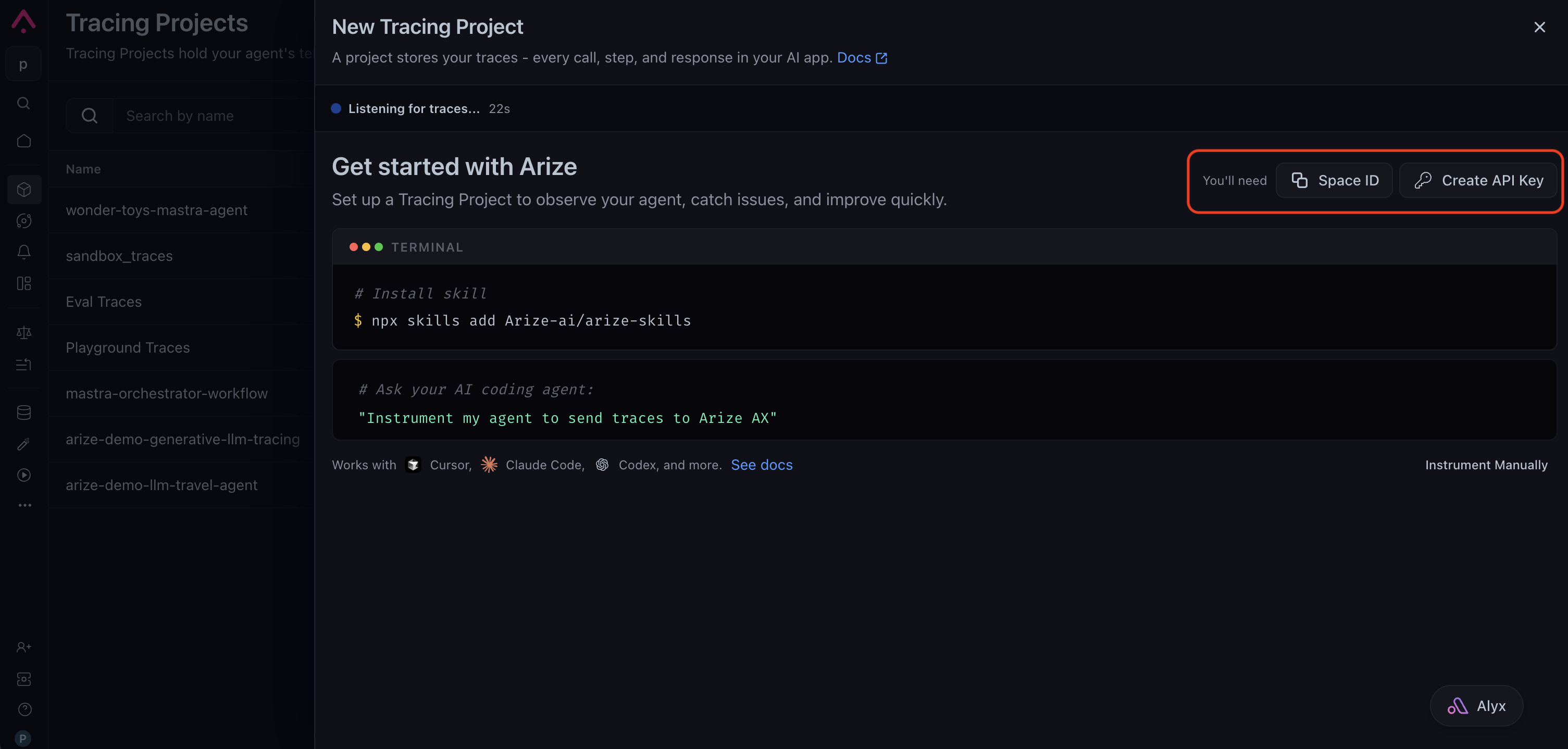
Sign in to your [Arize AX account](https://app.arize.com/) and create a tracing project from **Projects → New Tracing Project**. The setup page shows the credentials you need: copy your **Space ID**, then click **Create API Key** to generate a key and save it somewhere safe. You set them as `ARIZE_SPACE_ID` and `ARIZE_API_KEY` when you configure your environment, and they route your traces to the correct space.
 The steps below instrument a small example agent, a health coach with a single tool, so the trace shows the agent run, its model call, and its tool call end to end. Attach the instrumentor once at startup, and every agent run, model call, and tool call is then captured, with no manual spans and no change to your agent code.
**Prerequisites:** Python 3.10 or later.
Install the OpenInference instrumentor for LangChain alongside the framework and tracing dependencies. This example uses Anthropic as the model provider; swap `langchain-anthropic` for the provider package your agent uses.
```bash theme={null}
pip install arize-otel \
openinference-instrumentation-langchain \
openinference-instrumentation \
langchain langchain-anthropic
```
Set your Arize AX and model-provider credentials as environment variables. The tracing setup reads them at startup, so you keep secrets out of your source.
```bash theme={null}
export ARIZE_SPACE_ID=""
export ARIZE_API_KEY=""
export ARIZE_PROJECT_NAME="langchain-agent"
export ANTHROPIC_API_KEY=""
```
`ARIZE_PROJECT_NAME` is the project your traces land in. Name it for the app so runs stay grouped where you expect them.
Set up tracing in a dedicated module so it runs once, before your agent code imports LangChain. `register()` builds a tracer provider from your Arize credentials, and `LangChainInstrumentor().instrument(...)` connects that tracer to LangChain so every run emits spans.
```python tracing.py theme={null}
import os
from arize.otel import register
from openinference.instrumentation.langchain import LangChainInstrumentor
# register() reads ARIZE_SPACE_ID and ARIZE_API_KEY from the environment
# when the arguments are omitted. Pass them explicitly if you prefer.
tracer_provider = register(
space_id=os.environ["ARIZE_SPACE_ID"],
api_key=os.environ["ARIZE_API_KEY"],
project_name=os.environ.get("ARIZE_PROJECT_NAME", "langchain-agent"),
)
# Instrument LangChain so every agent run, model call, and tool call is traced.
LangChainInstrumentor().instrument(tracer_provider=tracer_provider)
```
Import this module before any `langchain` or `langchain_anthropic` import in your entry point, so LangChain is instrumented before your agent runs. Importing the tracing module first is the simplest way to guarantee that ordering.
```python main.py theme={null}
import tracing # noqa: F401 - must be imported before langchain
from langchain.agents import create_agent
# ... the rest of your application
```
If your app serves the agent from a web framework such as FastAPI or Flask, the LangChain instrumentor is still what captures the agent. Web-framework instrumentation only records HTTP requests, not the agent, model, and tool activity that make up an agent trace.
Run your app; either behind a web server, in a worker, or through the LangGraph dev server. Because you set up the instrumentation in the previous steps, the run is traced automatically. The example below is a small agent built with `create_agent` and one tool. Running this agent captures a full trace of the agent run, each model call, and the tool call.
```python theme={null}
import tracing # noqa: F401 - must be imported first
from langchain.agents import create_agent
from langchain_core.tools import tool
@tool
def suggest_workout(goal: str) -> dict:
"""Provide workout suggestions for the user's stated fitness goal."""
plans = {
"strength": "3 sets of push-ups, squats, and planks (20 minutes).",
"cardio": "A 25-minute brisk walk or light jog.",
}
return {"goal": goal, "suggestion": plans.get(goal, plans["cardio"])}
agent = create_agent(
model="anthropic:claude-sonnet-4-6",
tools=[suggest_workout],
system_prompt="You are a supportive health coach. Keep replies short.",
)
def handle_turn(prompt: str):
return agent.invoke({"messages": [{"role": "user", "content": prompt}]})
result = handle_turn("Suggest a cardio workout.")
print(result["messages"][-1].content)
```
Each tool the agent invokes appears as a child span under the run, with its inputs and outputs. The model is interchangeable: swap the `anthropic:claude-sonnet-4-6` identifier for another provider string such as `openai:gpt-5.5` or `google_genai:gemini-3.5-flash`, and the same instrumentor covers it.
A long-running service, such as a web server or worker, keeps exporting spans as it runs, so you can skip this step. It applies only to a process that exits right after a run, such as a script, a batch job, or a serverless function.
Spans are sent to Arize AX in the background, in batches, and a short-lived process can quit before the last batch goes out. Force that final send, a step called flushing, before the process ends so no traces are lost. `tracing.py` exposes the provider it built, so import it and flush.
```python theme={null}
import tracing # the module from the previous step
tracing.tracer_provider.force_flush()
```
Auto-instrumentation captures each run on its own. To follow a multi-turn conversation as a single thread, add a session ID to `handle_turn` and wrap the agent call in the `using_session()` context manager. Reuse the same ID across a conversation's turns, such as the user or thread ID.
```python theme={null}
from openinference.instrumentation import using_session
def handle_turn(session_id: str, prompt: str):
with using_session(session_id):
return agent.invoke({"messages": [{"role": "user", "content": prompt}]})
handle_turn("user-123", "Suggest a cardio workout.")
handle_turn("user-123", "Now suggest a strength workout.")
```
Every span emitted inside the block carries the same `session.id`, so both turns share one session and Arize AX groups them into a single conversation you can replay.
Open your Arize AX space and select the project you set in `ARIZE_PROJECT_NAME`. Within about 30 seconds of a run, a new trace appears with a `LangGraph` root span wrapping `ChatAnthropic` LLM spans and one TOOL span per tool the agent invoked. When you set a session ID, each span carries `session.id`. See [What gets captured](#what-gets-captured) for the full breakdown.
If no traces appear, see [Troubleshooting](#troubleshooting).
**Prerequisites:** Node.js 18 or later.
Install the OpenInference instrumentor for LangChain alongside the framework, the OpenTelemetry SDK, and tracing dependencies. This example uses Anthropic as the model provider; swap `@langchain/anthropic` for the provider package your agent uses.
```bash theme={null}
npm install langchain @langchain/core @langchain/anthropic zod \
@arizeai/openinference-instrumentation-langchain \
@arizeai/openinference-core \
@arizeai/openinference-semantic-conventions \
@opentelemetry/api \
@opentelemetry/exporter-trace-otlp-proto \
@opentelemetry/resources \
@opentelemetry/sdk-trace-base \
@opentelemetry/sdk-trace-node \
@opentelemetry/semantic-conventions
```
Set your Arize AX and model-provider credentials as environment variables. The tracing setup reads them at startup, so you keep secrets out of your source.
```bash theme={null}
export ARIZE_SPACE_ID=""
export ARIZE_API_KEY=""
export ARIZE_PROJECT_NAME="langchain-agent"
export ANTHROPIC_API_KEY=""
```
`ARIZE_PROJECT_NAME` is the project your traces land in. Name it for the app so runs stay grouped where you expect them.
Set up tracing in a dedicated module so it runs once, before your agent code imports LangChain. The module builds a tracer provider that exports to Arize AX, then connects that tracer to LangChain so every run emits spans.
```typescript instrumentation.ts theme={null}
import { OTLPTraceExporter } from "@opentelemetry/exporter-trace-otlp-proto";
import { resourceFromAttributes } from "@opentelemetry/resources";
import { SimpleSpanProcessor } from "@opentelemetry/sdk-trace-base";
import { NodeTracerProvider } from "@opentelemetry/sdk-trace-node";
import { ATTR_SERVICE_NAME } from "@opentelemetry/semantic-conventions";
import { SEMRESATTRS_PROJECT_NAME } from "@arizeai/openinference-semantic-conventions";
import { LangChainInstrumentation } from "@arizeai/openinference-instrumentation-langchain";
import * as CallbackManagerModule from "@langchain/core/callbacks/manager";
const projectName = process.env.ARIZE_PROJECT_NAME ?? "langchain-agent";
export const provider = new NodeTracerProvider({
resource: resourceFromAttributes({
[ATTR_SERVICE_NAME]: projectName,
[SEMRESATTRS_PROJECT_NAME]: projectName,
}),
spanProcessors: [
new SimpleSpanProcessor(
new OTLPTraceExporter({
url: "https://otlp.arize.com/v1/traces",
headers: {
"arize-space-id": process.env.ARIZE_SPACE_ID ?? "",
"arize-api-key": process.env.ARIZE_API_KEY ?? "",
},
}),
),
],
});
provider.register();
// manuallyInstrument() attaches the tracer through LangChain's callback
// manager module, so pass the imported module to it.
const instrumentation = new LangChainInstrumentation();
instrumentation.manuallyInstrument(CallbackManagerModule);
```
Import this module before any LangChain import in your entry point, so LangChain is instrumented before your agent runs. A side-effect import at the top of your entry point is enough.
```typescript main.ts theme={null}
import "./instrumentation";
import { createAgent } from "langchain";
// ... the rest of your application
```
If your app serves the agent from a web framework such as Express or Next.js, instrument LangChain itself. Those frameworks emit their own HTTP spans, and the LangChain spans nest under them. See [LangChain.js Tracing](/docs/ax/integrations/ts-js-agent-frameworks/langchain/langchain-js#span-filter) for a span processor that keeps a clean agent trace tree in that setup.
Run your app; either behind a web server, in a worker, or through the LangGraph dev server. Because you set up the instrumentation in the previous steps, the run is traced automatically. The example below is a small agent built with `createAgent` and one tool. Running this agent captures a full trace of the agent run, each model call, and the tool call.
```typescript theme={null}
import "./instrumentation";
import { tool } from "@langchain/core/tools";
import { createAgent } from "langchain";
import { z } from "zod";
const suggestWorkout = tool(
async ({ goal }) => {
const plans: Record = {
strength: "3 sets of push-ups, squats, and planks (20 minutes).",
cardio: "A 25-minute brisk walk or light jog.",
};
return JSON.stringify({ goal, suggestion: plans[goal] ?? plans.cardio });
},
{
name: "suggest_workout",
description: "Provide workout suggestions for the user's stated fitness goal.",
schema: z.object({ goal: z.string() }),
},
);
const agent = createAgent({
model: "anthropic:claude-sonnet-4-6",
tools: [suggestWorkout],
systemPrompt: "You are a supportive health coach. Keep replies short.",
});
async function handleTurn(prompt: string) {
return agent.invoke({ messages: [{ role: "user", content: prompt }] });
}
const result = await handleTurn("Suggest a cardio workout.");
console.log(result.messages[result.messages.length - 1].content);
```
Each tool the agent invokes appears as a child span under the run, with its inputs and outputs. The model is interchangeable: swap the `anthropic:claude-sonnet-4-6` identifier for another provider string such as `openai:gpt-5.5` or `google_genai:gemini-3.5-flash`, and the same instrumentor covers it.
A long-running service, such as a web server or worker, keeps exporting spans as it runs, so you can skip this step. It applies only to a process that exits right after a run, such as a script, a batch job, or a serverless function.
LangChain.js records its tracing callbacks in the background, so the trace can still be finishing after `invoke()` resolves. First wait for those callbacks to finish, then force the final send, a step called flushing, before the process exits, or the last spans never reach Arize AX.
```typescript theme={null}
import { awaitAllCallbacks } from "@langchain/core/callbacks/promises";
import { provider } from "./instrumentation";
await awaitAllCallbacks();
await provider.forceFlush();
```
Auto-instrumentation captures each run on its own. To follow a multi-turn conversation as a single thread, add a session ID to `handleTurn`: set it on the active context with `setSession`, then run the agent inside `context.with`. Reuse the same ID across a conversation's turns, such as the user or thread ID.
```typescript theme={null}
import { context } from "@opentelemetry/api";
import { setSession } from "@arizeai/openinference-core";
async function handleTurn(sessionId: string, prompt: string) {
return context.with(setSession(context.active(), { sessionId }), () =>
agent.invoke({ messages: [{ role: "user", content: prompt }] }),
);
}
await handleTurn("user-123", "Suggest a cardio workout.");
await handleTurn("user-123", "Now suggest a strength workout.");
```
Every span emitted inside the block carries the same `session.id`, so both turns share one session and Arize AX groups them into a single conversation you can replay.
Open your Arize AX space and select the project you set in `ARIZE_PROJECT_NAME`. Within about 30 seconds of a run, a new trace appears with a `LangGraph` root span wrapping `ChatAnthropic` LLM spans and one TOOL span per tool the agent invoked. When you set a session ID, each span carries `session.id`. See [What gets captured](#what-gets-captured) for the full breakdown.
If no traces appear, see [Troubleshooting](#troubleshooting).
## What gets captured
The LangChain instrumentor records the full shape of each agent run:
* **Agent run.** A `LangGraph` root span for the whole `create_agent` invocation, wrapping every step the graph takes. `create_agent` runs on LangGraph, so the root span carries the `LangGraph` name.
* **LLM spans.** One span per model call, with the input messages, the response, the model name, and token counts. This is where each reasoning turn and each tool-calling decision is recorded.
* **Tool spans.** One TOOL span per tool invocation, with the tool name, inputs, and outputs, so you can see what the agent decided to do and what each tool returned.
* **Chain spans.** The graph nodes and runnable structure that connect the model and tool steps, so the trace tree mirrors your agent's control flow.
* **Session grouping.** The `session.id` you set, which threads related runs into one conversation.
## Trace tool usage
Tool calls are traced automatically. Because `create_agent` runs the model-and-tools loop itself and every step flows through LangChain's callback manager, the instrumentor captures both the model's decision to call a tool and your application executing it. You do not add manual spans, unlike a raw provider SDK where the instrumentor sees only the model call.
Each tool the agent invokes becomes its own TOOL span, a child of the agent run:
* `tool.name` is the tool that ran, such as `suggest_workout`.
* `input.value` holds the arguments the model passed, such as `{"goal": "cardio"}`.
* `output.value` holds what the tool returned, so you can see the exact result fed back to the model.
This lets you audit tool selection and tool results directly in the trace. When you want to record work that happens outside a LangChain tool, such as a database call in your own code, add a manual span next to the automatic ones. See [Combine auto and manual instrumentation](/docs/ax/instrument/combining-auto-and-manual).
## Chains and legacy agents
The instrumentor from this guide covers the rest of LangChain with no extra setup. LCEL chains such as `prompt | model | parser` are traced as a `RunnableSequence` span wrapping the prompt, model, and parser steps. The prebuilt `create_react_agent` and legacy `AgentExecutor` agents are traced the same way, with no change to the setup.
## Troubleshooting
* **No traces in Arize AX.** Confirm `ARIZE_SPACE_ID` and `ARIZE_API_KEY` are set in the same shell that runs your app. Enable OpenTelemetry debug logs with `export OTEL_LOG_LEVEL=debug` and rerun.
* **Spans missing.** `LangChainInstrumentor().instrument(...)` must run before any `langchain` import. Make sure your tracing module is the first import in your entry point.
* **Trace is cut off or empty in a script.** Spans export in the background. Call `tracing.tracer_provider.force_flush()` before a short-lived script exits so the last batch is sent.
* **`session.id` not on spans.** The instrumentor does not set session or user IDs on its own. Wrap the agent call in `using_session()` (and `using_user()` if needed) from `openinference.instrumentation`.
* **`401` or `404` from your model provider.** Verify the provider API key is set and valid, and that your key has access to the model your agent requests.
* **No traces in Arize AX.** Confirm `ARIZE_SPACE_ID` and `ARIZE_API_KEY` are set in the same shell that runs your app. Enable OpenTelemetry debug logs with `export OTEL_LOG_LEVEL=debug` and rerun.
* **Spans missing.** `instrumentation.manuallyInstrument(CallbackManagerModule)` must run before any LangChain import. Make sure `import { provider } from "./instrumentation"` (or a side-effect-only `import "./instrumentation"`) is the first import in your entry point.
* **Root span missing or trace cut off in a script.** LangChain.js runs its tracing callbacks in the background, so the root span can end after `invoke()` resolves. Call `await awaitAllCallbacks()` (from `@langchain/core/callbacks/promises`) and then `await provider.forceFlush()` before the process exits, or set `LANGCHAIN_CALLBACKS_BACKGROUND=false`.
* **LangChain spans nested under HTTP spans.** Expected when LangChain runs alongside HTTP instrumentation or a framework such as Next.js. See [LangChain.js Tracing](/docs/ax/integrations/ts-js-agent-frameworks/langchain/langchain-js#span-filter) for a span processor that promotes the agent span to root.
* **`401` or `404` from your model provider.** Verify the provider API key is set and valid, and that your key has access to the model your agent requests.
## Next steps
Group multi-turn runs into conversations with session and user IDs.
Attach metadata, tags, and custom attributes to your spans.
Score tool selection, tool results, and goal completion.
The reference pages for the LangChain instrumentor in Python and TypeScript.
The steps below instrument a small example agent, a health coach with a single tool, so the trace shows the agent run, its model call, and its tool call end to end. Attach the instrumentor once at startup, and every agent run, model call, and tool call is then captured, with no manual spans and no change to your agent code.
**Prerequisites:** Python 3.10 or later.
Install the OpenInference instrumentor for LangChain alongside the framework and tracing dependencies. This example uses Anthropic as the model provider; swap `langchain-anthropic` for the provider package your agent uses.
```bash theme={null}
pip install arize-otel \
openinference-instrumentation-langchain \
openinference-instrumentation \
langchain langchain-anthropic
```
Set your Arize AX and model-provider credentials as environment variables. The tracing setup reads them at startup, so you keep secrets out of your source.
```bash theme={null}
export ARIZE_SPACE_ID=""
export ARIZE_API_KEY=""
export ARIZE_PROJECT_NAME="langchain-agent"
export ANTHROPIC_API_KEY=""
```
`ARIZE_PROJECT_NAME` is the project your traces land in. Name it for the app so runs stay grouped where you expect them.
Set up tracing in a dedicated module so it runs once, before your agent code imports LangChain. `register()` builds a tracer provider from your Arize credentials, and `LangChainInstrumentor().instrument(...)` connects that tracer to LangChain so every run emits spans.
```python tracing.py theme={null}
import os
from arize.otel import register
from openinference.instrumentation.langchain import LangChainInstrumentor
# register() reads ARIZE_SPACE_ID and ARIZE_API_KEY from the environment
# when the arguments are omitted. Pass them explicitly if you prefer.
tracer_provider = register(
space_id=os.environ["ARIZE_SPACE_ID"],
api_key=os.environ["ARIZE_API_KEY"],
project_name=os.environ.get("ARIZE_PROJECT_NAME", "langchain-agent"),
)
# Instrument LangChain so every agent run, model call, and tool call is traced.
LangChainInstrumentor().instrument(tracer_provider=tracer_provider)
```
Import this module before any `langchain` or `langchain_anthropic` import in your entry point, so LangChain is instrumented before your agent runs. Importing the tracing module first is the simplest way to guarantee that ordering.
```python main.py theme={null}
import tracing # noqa: F401 - must be imported before langchain
from langchain.agents import create_agent
# ... the rest of your application
```
If your app serves the agent from a web framework such as FastAPI or Flask, the LangChain instrumentor is still what captures the agent. Web-framework instrumentation only records HTTP requests, not the agent, model, and tool activity that make up an agent trace.
Run your app; either behind a web server, in a worker, or through the LangGraph dev server. Because you set up the instrumentation in the previous steps, the run is traced automatically. The example below is a small agent built with `create_agent` and one tool. Running this agent captures a full trace of the agent run, each model call, and the tool call.
```python theme={null}
import tracing # noqa: F401 - must be imported first
from langchain.agents import create_agent
from langchain_core.tools import tool
@tool
def suggest_workout(goal: str) -> dict:
"""Provide workout suggestions for the user's stated fitness goal."""
plans = {
"strength": "3 sets of push-ups, squats, and planks (20 minutes).",
"cardio": "A 25-minute brisk walk or light jog.",
}
return {"goal": goal, "suggestion": plans.get(goal, plans["cardio"])}
agent = create_agent(
model="anthropic:claude-sonnet-4-6",
tools=[suggest_workout],
system_prompt="You are a supportive health coach. Keep replies short.",
)
def handle_turn(prompt: str):
return agent.invoke({"messages": [{"role": "user", "content": prompt}]})
result = handle_turn("Suggest a cardio workout.")
print(result["messages"][-1].content)
```
Each tool the agent invokes appears as a child span under the run, with its inputs and outputs. The model is interchangeable: swap the `anthropic:claude-sonnet-4-6` identifier for another provider string such as `openai:gpt-5.5` or `google_genai:gemini-3.5-flash`, and the same instrumentor covers it.
A long-running service, such as a web server or worker, keeps exporting spans as it runs, so you can skip this step. It applies only to a process that exits right after a run, such as a script, a batch job, or a serverless function.
Spans are sent to Arize AX in the background, in batches, and a short-lived process can quit before the last batch goes out. Force that final send, a step called flushing, before the process ends so no traces are lost. `tracing.py` exposes the provider it built, so import it and flush.
```python theme={null}
import tracing # the module from the previous step
tracing.tracer_provider.force_flush()
```
Auto-instrumentation captures each run on its own. To follow a multi-turn conversation as a single thread, add a session ID to `handle_turn` and wrap the agent call in the `using_session()` context manager. Reuse the same ID across a conversation's turns, such as the user or thread ID.
```python theme={null}
from openinference.instrumentation import using_session
def handle_turn(session_id: str, prompt: str):
with using_session(session_id):
return agent.invoke({"messages": [{"role": "user", "content": prompt}]})
handle_turn("user-123", "Suggest a cardio workout.")
handle_turn("user-123", "Now suggest a strength workout.")
```
Every span emitted inside the block carries the same `session.id`, so both turns share one session and Arize AX groups them into a single conversation you can replay.
Open your Arize AX space and select the project you set in `ARIZE_PROJECT_NAME`. Within about 30 seconds of a run, a new trace appears with a `LangGraph` root span wrapping `ChatAnthropic` LLM spans and one TOOL span per tool the agent invoked. When you set a session ID, each span carries `session.id`. See [What gets captured](#what-gets-captured) for the full breakdown.
If no traces appear, see [Troubleshooting](#troubleshooting).
**Prerequisites:** Node.js 18 or later.
Install the OpenInference instrumentor for LangChain alongside the framework, the OpenTelemetry SDK, and tracing dependencies. This example uses Anthropic as the model provider; swap `@langchain/anthropic` for the provider package your agent uses.
```bash theme={null}
npm install langchain @langchain/core @langchain/anthropic zod \
@arizeai/openinference-instrumentation-langchain \
@arizeai/openinference-core \
@arizeai/openinference-semantic-conventions \
@opentelemetry/api \
@opentelemetry/exporter-trace-otlp-proto \
@opentelemetry/resources \
@opentelemetry/sdk-trace-base \
@opentelemetry/sdk-trace-node \
@opentelemetry/semantic-conventions
```
Set your Arize AX and model-provider credentials as environment variables. The tracing setup reads them at startup, so you keep secrets out of your source.
```bash theme={null}
export ARIZE_SPACE_ID=""
export ARIZE_API_KEY=""
export ARIZE_PROJECT_NAME="langchain-agent"
export ANTHROPIC_API_KEY=""
```
`ARIZE_PROJECT_NAME` is the project your traces land in. Name it for the app so runs stay grouped where you expect them.
Set up tracing in a dedicated module so it runs once, before your agent code imports LangChain. The module builds a tracer provider that exports to Arize AX, then connects that tracer to LangChain so every run emits spans.
```typescript instrumentation.ts theme={null}
import { OTLPTraceExporter } from "@opentelemetry/exporter-trace-otlp-proto";
import { resourceFromAttributes } from "@opentelemetry/resources";
import { SimpleSpanProcessor } from "@opentelemetry/sdk-trace-base";
import { NodeTracerProvider } from "@opentelemetry/sdk-trace-node";
import { ATTR_SERVICE_NAME } from "@opentelemetry/semantic-conventions";
import { SEMRESATTRS_PROJECT_NAME } from "@arizeai/openinference-semantic-conventions";
import { LangChainInstrumentation } from "@arizeai/openinference-instrumentation-langchain";
import * as CallbackManagerModule from "@langchain/core/callbacks/manager";
const projectName = process.env.ARIZE_PROJECT_NAME ?? "langchain-agent";
export const provider = new NodeTracerProvider({
resource: resourceFromAttributes({
[ATTR_SERVICE_NAME]: projectName,
[SEMRESATTRS_PROJECT_NAME]: projectName,
}),
spanProcessors: [
new SimpleSpanProcessor(
new OTLPTraceExporter({
url: "https://otlp.arize.com/v1/traces",
headers: {
"arize-space-id": process.env.ARIZE_SPACE_ID ?? "",
"arize-api-key": process.env.ARIZE_API_KEY ?? "",
},
}),
),
],
});
provider.register();
// manuallyInstrument() attaches the tracer through LangChain's callback
// manager module, so pass the imported module to it.
const instrumentation = new LangChainInstrumentation();
instrumentation.manuallyInstrument(CallbackManagerModule);
```
Import this module before any LangChain import in your entry point, so LangChain is instrumented before your agent runs. A side-effect import at the top of your entry point is enough.
```typescript main.ts theme={null}
import "./instrumentation";
import { createAgent } from "langchain";
// ... the rest of your application
```
If your app serves the agent from a web framework such as Express or Next.js, instrument LangChain itself. Those frameworks emit their own HTTP spans, and the LangChain spans nest under them. See [LangChain.js Tracing](/docs/ax/integrations/ts-js-agent-frameworks/langchain/langchain-js#span-filter) for a span processor that keeps a clean agent trace tree in that setup.
Run your app; either behind a web server, in a worker, or through the LangGraph dev server. Because you set up the instrumentation in the previous steps, the run is traced automatically. The example below is a small agent built with `createAgent` and one tool. Running this agent captures a full trace of the agent run, each model call, and the tool call.
```typescript theme={null}
import "./instrumentation";
import { tool } from "@langchain/core/tools";
import { createAgent } from "langchain";
import { z } from "zod";
const suggestWorkout = tool(
async ({ goal }) => {
const plans: Record = {
strength: "3 sets of push-ups, squats, and planks (20 minutes).",
cardio: "A 25-minute brisk walk or light jog.",
};
return JSON.stringify({ goal, suggestion: plans[goal] ?? plans.cardio });
},
{
name: "suggest_workout",
description: "Provide workout suggestions for the user's stated fitness goal.",
schema: z.object({ goal: z.string() }),
},
);
const agent = createAgent({
model: "anthropic:claude-sonnet-4-6",
tools: [suggestWorkout],
systemPrompt: "You are a supportive health coach. Keep replies short.",
});
async function handleTurn(prompt: string) {
return agent.invoke({ messages: [{ role: "user", content: prompt }] });
}
const result = await handleTurn("Suggest a cardio workout.");
console.log(result.messages[result.messages.length - 1].content);
```
Each tool the agent invokes appears as a child span under the run, with its inputs and outputs. The model is interchangeable: swap the `anthropic:claude-sonnet-4-6` identifier for another provider string such as `openai:gpt-5.5` or `google_genai:gemini-3.5-flash`, and the same instrumentor covers it.
A long-running service, such as a web server or worker, keeps exporting spans as it runs, so you can skip this step. It applies only to a process that exits right after a run, such as a script, a batch job, or a serverless function.
LangChain.js records its tracing callbacks in the background, so the trace can still be finishing after `invoke()` resolves. First wait for those callbacks to finish, then force the final send, a step called flushing, before the process exits, or the last spans never reach Arize AX.
```typescript theme={null}
import { awaitAllCallbacks } from "@langchain/core/callbacks/promises";
import { provider } from "./instrumentation";
await awaitAllCallbacks();
await provider.forceFlush();
```
Auto-instrumentation captures each run on its own. To follow a multi-turn conversation as a single thread, add a session ID to `handleTurn`: set it on the active context with `setSession`, then run the agent inside `context.with`. Reuse the same ID across a conversation's turns, such as the user or thread ID.
```typescript theme={null}
import { context } from "@opentelemetry/api";
import { setSession } from "@arizeai/openinference-core";
async function handleTurn(sessionId: string, prompt: string) {
return context.with(setSession(context.active(), { sessionId }), () =>
agent.invoke({ messages: [{ role: "user", content: prompt }] }),
);
}
await handleTurn("user-123", "Suggest a cardio workout.");
await handleTurn("user-123", "Now suggest a strength workout.");
```
Every span emitted inside the block carries the same `session.id`, so both turns share one session and Arize AX groups them into a single conversation you can replay.
Open your Arize AX space and select the project you set in `ARIZE_PROJECT_NAME`. Within about 30 seconds of a run, a new trace appears with a `LangGraph` root span wrapping `ChatAnthropic` LLM spans and one TOOL span per tool the agent invoked. When you set a session ID, each span carries `session.id`. See [What gets captured](#what-gets-captured) for the full breakdown.
If no traces appear, see [Troubleshooting](#troubleshooting).
## What gets captured
The LangChain instrumentor records the full shape of each agent run:
* **Agent run.** A `LangGraph` root span for the whole `create_agent` invocation, wrapping every step the graph takes. `create_agent` runs on LangGraph, so the root span carries the `LangGraph` name.
* **LLM spans.** One span per model call, with the input messages, the response, the model name, and token counts. This is where each reasoning turn and each tool-calling decision is recorded.
* **Tool spans.** One TOOL span per tool invocation, with the tool name, inputs, and outputs, so you can see what the agent decided to do and what each tool returned.
* **Chain spans.** The graph nodes and runnable structure that connect the model and tool steps, so the trace tree mirrors your agent's control flow.
* **Session grouping.** The `session.id` you set, which threads related runs into one conversation.
## Trace tool usage
Tool calls are traced automatically. Because `create_agent` runs the model-and-tools loop itself and every step flows through LangChain's callback manager, the instrumentor captures both the model's decision to call a tool and your application executing it. You do not add manual spans, unlike a raw provider SDK where the instrumentor sees only the model call.
Each tool the agent invokes becomes its own TOOL span, a child of the agent run:
* `tool.name` is the tool that ran, such as `suggest_workout`.
* `input.value` holds the arguments the model passed, such as `{"goal": "cardio"}`.
* `output.value` holds what the tool returned, so you can see the exact result fed back to the model.
This lets you audit tool selection and tool results directly in the trace. When you want to record work that happens outside a LangChain tool, such as a database call in your own code, add a manual span next to the automatic ones. See [Combine auto and manual instrumentation](/docs/ax/instrument/combining-auto-and-manual).
## Chains and legacy agents
The instrumentor from this guide covers the rest of LangChain with no extra setup. LCEL chains such as `prompt | model | parser` are traced as a `RunnableSequence` span wrapping the prompt, model, and parser steps. The prebuilt `create_react_agent` and legacy `AgentExecutor` agents are traced the same way, with no change to the setup.
## Troubleshooting
* **No traces in Arize AX.** Confirm `ARIZE_SPACE_ID` and `ARIZE_API_KEY` are set in the same shell that runs your app. Enable OpenTelemetry debug logs with `export OTEL_LOG_LEVEL=debug` and rerun.
* **Spans missing.** `LangChainInstrumentor().instrument(...)` must run before any `langchain` import. Make sure your tracing module is the first import in your entry point.
* **Trace is cut off or empty in a script.** Spans export in the background. Call `tracing.tracer_provider.force_flush()` before a short-lived script exits so the last batch is sent.
* **`session.id` not on spans.** The instrumentor does not set session or user IDs on its own. Wrap the agent call in `using_session()` (and `using_user()` if needed) from `openinference.instrumentation`.
* **`401` or `404` from your model provider.** Verify the provider API key is set and valid, and that your key has access to the model your agent requests.
* **No traces in Arize AX.** Confirm `ARIZE_SPACE_ID` and `ARIZE_API_KEY` are set in the same shell that runs your app. Enable OpenTelemetry debug logs with `export OTEL_LOG_LEVEL=debug` and rerun.
* **Spans missing.** `instrumentation.manuallyInstrument(CallbackManagerModule)` must run before any LangChain import. Make sure `import { provider } from "./instrumentation"` (or a side-effect-only `import "./instrumentation"`) is the first import in your entry point.
* **Root span missing or trace cut off in a script.** LangChain.js runs its tracing callbacks in the background, so the root span can end after `invoke()` resolves. Call `await awaitAllCallbacks()` (from `@langchain/core/callbacks/promises`) and then `await provider.forceFlush()` before the process exits, or set `LANGCHAIN_CALLBACKS_BACKGROUND=false`.
* **LangChain spans nested under HTTP spans.** Expected when LangChain runs alongside HTTP instrumentation or a framework such as Next.js. See [LangChain.js Tracing](/docs/ax/integrations/ts-js-agent-frameworks/langchain/langchain-js#span-filter) for a span processor that promotes the agent span to root.
* **`401` or `404` from your model provider.** Verify the provider API key is set and valid, and that your key has access to the model your agent requests.
## Next steps
Group multi-turn runs into conversations with session and user IDs.
Attach metadata, tags, and custom attributes to your spans.
Score tool selection, tool results, and goal completion.
The reference pages for the LangChain instrumentor in Python and TypeScript.