> ## Documentation Index
> Fetch the complete documentation index at: https://arize-ax.mintlify.site/docs/llms.txt
> Use this file to discover all available pages before exploring further.
# Run experiments and evals from the platform
> Run LLM experiment tasks and evaluations end-to-end in the Arize AX platform using Prompt Playground and the Evaluator Hub—no evaluation code required.
Most experiment workflows follow the same pattern: run a single-turn prompt task over a dataset, then score the outputs with a judge or a deterministic check. Arize AX handles both ends natively — use Prompt Playground to run and save the task, and the Evaluator Hub to define and trigger the eval.
## Run the experiment from the platform
### 1. Define the task in Prompt Playground
Load your prompt and dataset into the [Prompt Playground](/docs/ax/prompts/prompt-playground), run it over every row, and [save the outputs as an experiment](/docs/ax/prompts/prompt-playground/save-playground-outputs-as-an-experiment).
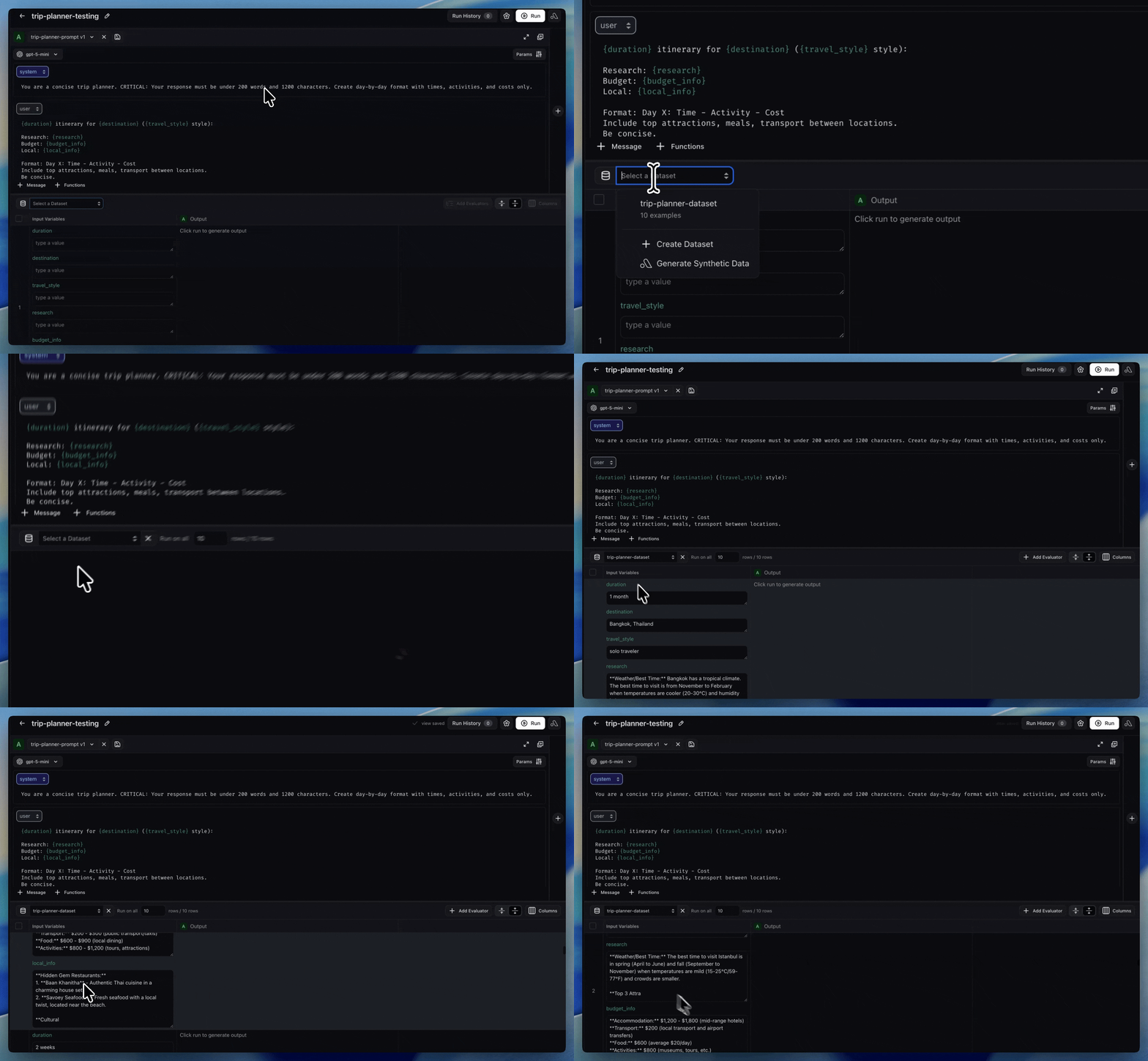 For a step-by-step walkthrough, see [Test prompts on datasets](/docs/ax/prompts/tutorial/test-prompt-in-playground).
### 2. Add an LLM-as-a-judge from the Evaluator Hub
Create a judge evaluator in the [Evaluator Hub](/docs/ax/evaluate/create-evaluators#llm-as-a-judge) and attach it to your experiment. The hub gives you versioning, reuse across projects, and alignment tracking. See [LLM as a judge](/docs/ax/evaluate/evaluators/llm-as-a-judge) for guidance on writing the prompt template.
For a step-by-step walkthrough, see [Test prompts on datasets](/docs/ax/prompts/tutorial/test-prompt-in-playground).
### 2. Add an LLM-as-a-judge from the Evaluator Hub
Create a judge evaluator in the [Evaluator Hub](/docs/ax/evaluate/create-evaluators#llm-as-a-judge) and attach it to your experiment. The hub gives you versioning, reuse across projects, and alignment tracking. See [LLM as a judge](/docs/ax/evaluate/evaluators/llm-as-a-judge) for guidance on writing the prompt template.

 ### 3. Add a code evaluator (when rules are deterministic)
For objective checks — JSON validity, keyword presence, regex matching — create a [code evaluator](/docs/ax/evaluate/evaluators/code-evaluations) instead of an LLM judge. Code evals run instantly and have no inference cost.
### 4. Run, view, and compare
Choose the experiments you want to evaluate, click **Run**, and view the scored results inline. Use [Compare experiments](/docs/ax/develop/datasets-and-experiments/compare-experiments) to diff outputs and eval scores across prompt or model versions side by side.
### 3. Add a code evaluator (when rules are deterministic)
For objective checks — JSON validity, keyword presence, regex matching — create a [code evaluator](/docs/ax/evaluate/evaluators/code-evaluations) instead of an LLM judge. Code evals run instantly and have no inference cost.
### 4. Run, view, and compare
Choose the experiments you want to evaluate, click **Run**, and view the scored results inline. Use [Compare experiments](/docs/ax/develop/datasets-and-experiments/compare-experiments) to diff outputs and eval scores across prompt or model versions side by side.

 ## When to drop down to code
Use the SDK directly when the platform cannot express your workflow:
* **Multi-step agent tasks** — loops with tool use, branching logic, or state that must be driven from your code.
* **Tightly coupled deterministic logic** — checks that depend on internal Python types or business logic that don't map cleanly to a code-eval template.
* **CI/CD pipelines** — when the experiment and score must run inside a Python test runner and gate a deployment. See [GitHub Action basics](/docs/ax/develop/datasets-and-experiments/ci-cd-for-automated-experiments/github-action-basics) and [GitLab CI/CD basics](/docs/ax/develop/datasets-and-experiments/ci-cd-for-automated-experiments/gitlab-ci-cd-basics).
## Alternative: define evaluators as a class in the SDK
The class-based API is an alternative for the cases above, or if you prefer object-oriented patterns over functional ones.
### Eval class inputs
| Parameter name | Description | Example |
| -------------- | ----------------------------------- | ------------------------------------------- |
| `input` | experiment run input | `def evaluate(self, input, **kwargs)` |
| `output` | experiment run output | `def evaluate(self, output, **kwargs)` |
| `dataset_row` | entire row of the dataset as a dict | `def evaluate(self, dataset_row, **kwargs)` |
| `metadata` | experiment metadata | `def evaluate(self, metadata, **kwargs)` |
```python theme={null}
from arize.experiments import Evaluator
class ExampleAll(Evaluator):
def evaluate(self, input, output, dataset_row, metadata, **kwargs) -> EvaluationResult:
pass
class ExampleOutput(Evaluator):
def evaluate(self, output, **kwargs) -> EvaluationResult:
pass
class ExampleDatasetRow(Evaluator):
def evaluate(self, dataset_row, **kwargs) -> EvaluationResult:
pass
```
### EvaluationResult outputs
| Return type | Description |
| ------------------ | ----------------------------- |
| `EvaluationResult` | Score, label, and explanation |
| `float` | Numeric score only |
| `string` | Label only |
```python theme={null}
class ExampleResult(Evaluator):
def evaluate(self, input, output, dataset_row, metadata, **kwargs) -> EvaluationResult:
return EvaluationResult(score=score, label=label, explanation=explanation)
class ExampleScore(Evaluator):
def evaluate(self, output, **kwargs) -> EvaluationResult:
return 1.0
class ExampleLabel(Evaluator):
def evaluate(self, output, **kwargs) -> EvaluationResult:
return "good"
```
### Code evaluator as a class
```python theme={null}
from arize.experiments import EvaluationResult, Evaluator
class MatchesExpected(Evaluator):
annotator_kind = "CODE"
name = "matches_expected"
def evaluate(self, output, dataset_row, **kwargs) -> EvaluationResult:
expected_output = dataset_row.get("expected")
label = expected_output == output
score = float(label)
return EvaluationResult(score=score, label=label)
async def async_evaluate(self, *, output, dataset_row, **kwargs) -> EvaluationResult:
return self.evaluate(output=output, dataset_row=dataset_row)
```
Pass the evaluator class instance to `evaluators` when running the experiment:
```python theme={null}
experiment, results_df = client.experiments.run(
name="my-experiment",
dataset_id=dataset_id,
task=my_task,
evaluators=[MatchesExpected()],
)
```
For LLM-as-a-judge in code, define the judge in the [Evaluator Hub](/docs/ax/evaluate/create-evaluators#llm-as-a-judge) and trigger it on your experiment via [`ax tasks trigger-run`](/docs/ax/evaluate/run-evals-on-experiments) rather than calling `llm_classify` inside an `Evaluator` subclass.
### Multiple evaluators on experiment runs
Pass multiple evaluators in a list. Arize creates an evaluation run for every combination of experiment run and evaluator.
```python theme={null}
experiment, results_df = client.experiments.run(
name="multi-eval-experiment",
dataset_id=dataset_id,
task=task,
evaluators=[
ContainsKeyword("hello"),
MatchesRegex(r"\d+"),
custom_evaluator_function,
]
)
```
## Related
Run evaluators on experiments from the UI overview.
Create datasets and run experiments end to end.
Full guide to scoring experiments — UI, Arize Skills, and By Code tabs.
Build LLM-as-a-judge and code evaluators in the Evaluator Hub.
Run prompts over datasets and save outputs as experiments.
Diff outputs and eval scores across prompt or model versions.
## When to drop down to code
Use the SDK directly when the platform cannot express your workflow:
* **Multi-step agent tasks** — loops with tool use, branching logic, or state that must be driven from your code.
* **Tightly coupled deterministic logic** — checks that depend on internal Python types or business logic that don't map cleanly to a code-eval template.
* **CI/CD pipelines** — when the experiment and score must run inside a Python test runner and gate a deployment. See [GitHub Action basics](/docs/ax/develop/datasets-and-experiments/ci-cd-for-automated-experiments/github-action-basics) and [GitLab CI/CD basics](/docs/ax/develop/datasets-and-experiments/ci-cd-for-automated-experiments/gitlab-ci-cd-basics).
## Alternative: define evaluators as a class in the SDK
The class-based API is an alternative for the cases above, or if you prefer object-oriented patterns over functional ones.
### Eval class inputs
| Parameter name | Description | Example |
| -------------- | ----------------------------------- | ------------------------------------------- |
| `input` | experiment run input | `def evaluate(self, input, **kwargs)` |
| `output` | experiment run output | `def evaluate(self, output, **kwargs)` |
| `dataset_row` | entire row of the dataset as a dict | `def evaluate(self, dataset_row, **kwargs)` |
| `metadata` | experiment metadata | `def evaluate(self, metadata, **kwargs)` |
```python theme={null}
from arize.experiments import Evaluator
class ExampleAll(Evaluator):
def evaluate(self, input, output, dataset_row, metadata, **kwargs) -> EvaluationResult:
pass
class ExampleOutput(Evaluator):
def evaluate(self, output, **kwargs) -> EvaluationResult:
pass
class ExampleDatasetRow(Evaluator):
def evaluate(self, dataset_row, **kwargs) -> EvaluationResult:
pass
```
### EvaluationResult outputs
| Return type | Description |
| ------------------ | ----------------------------- |
| `EvaluationResult` | Score, label, and explanation |
| `float` | Numeric score only |
| `string` | Label only |
```python theme={null}
class ExampleResult(Evaluator):
def evaluate(self, input, output, dataset_row, metadata, **kwargs) -> EvaluationResult:
return EvaluationResult(score=score, label=label, explanation=explanation)
class ExampleScore(Evaluator):
def evaluate(self, output, **kwargs) -> EvaluationResult:
return 1.0
class ExampleLabel(Evaluator):
def evaluate(self, output, **kwargs) -> EvaluationResult:
return "good"
```
### Code evaluator as a class
```python theme={null}
from arize.experiments import EvaluationResult, Evaluator
class MatchesExpected(Evaluator):
annotator_kind = "CODE"
name = "matches_expected"
def evaluate(self, output, dataset_row, **kwargs) -> EvaluationResult:
expected_output = dataset_row.get("expected")
label = expected_output == output
score = float(label)
return EvaluationResult(score=score, label=label)
async def async_evaluate(self, *, output, dataset_row, **kwargs) -> EvaluationResult:
return self.evaluate(output=output, dataset_row=dataset_row)
```
Pass the evaluator class instance to `evaluators` when running the experiment:
```python theme={null}
experiment, results_df = client.experiments.run(
name="my-experiment",
dataset_id=dataset_id,
task=my_task,
evaluators=[MatchesExpected()],
)
```
For LLM-as-a-judge in code, define the judge in the [Evaluator Hub](/docs/ax/evaluate/create-evaluators#llm-as-a-judge) and trigger it on your experiment via [`ax tasks trigger-run`](/docs/ax/evaluate/run-evals-on-experiments) rather than calling `llm_classify` inside an `Evaluator` subclass.
### Multiple evaluators on experiment runs
Pass multiple evaluators in a list. Arize creates an evaluation run for every combination of experiment run and evaluator.
```python theme={null}
experiment, results_df = client.experiments.run(
name="multi-eval-experiment",
dataset_id=dataset_id,
task=task,
evaluators=[
ContainsKeyword("hello"),
MatchesRegex(r"\d+"),
custom_evaluator_function,
]
)
```
## Related
Run evaluators on experiments from the UI overview.
Create datasets and run experiments end to end.
Full guide to scoring experiments — UI, Arize Skills, and By Code tabs.
Build LLM-as-a-judge and code evaluators in the Evaluator Hub.
Run prompts over datasets and save outputs as experiments.
Diff outputs and eval scores across prompt or model versions.