> ## Documentation Index
> Fetch the complete documentation index at: https://arize-ax.mintlify.site/docs/llms.txt
> Use this file to discover all available pages before exploring further.
# Tracking Token Usage
> Use token counts to find problematic traces, long running conversations or investigate prompt variable or context overflow
Arize ensures that LLM spans in the platform will contain token count values. We use the logic below to compute input and completion token counts per LLM span, and aggregate the counts up to the trace level.
A few useful flows for token counts include:
* Investigating/sorting traces or sessions by token count to find long running traces or sessions
* Monitoring or setting custom metrics (i.e. for cost) on token count
* *(soon)* Monitoring and debugging prompt variables using token counts
In the platform, the 3 possible states for token count calculations are shown below.
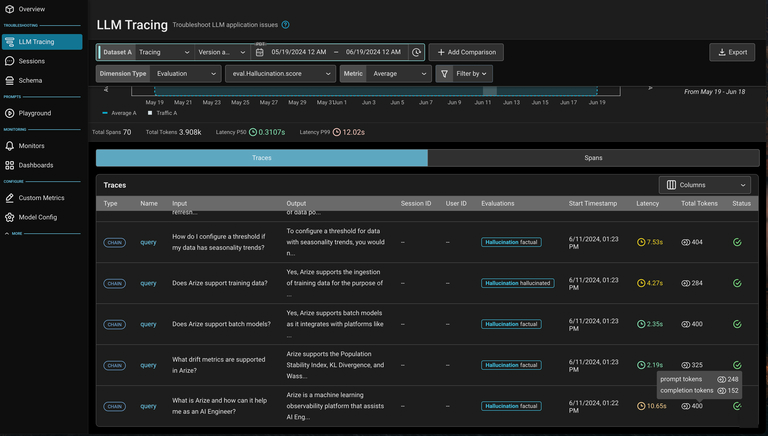
In the platform, you can see token counts aggregated in the tracing table below. Click into a trace to view token counts at the span level.
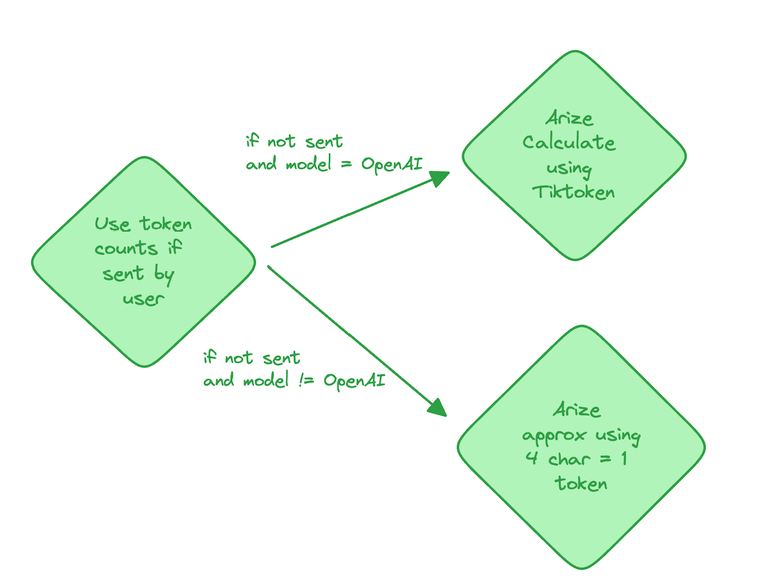 In the platform, the 3 possible states for token count calculations are shown below.
 In the platform, you can see token counts aggregated in the tracing table below. Click into a trace to view token counts at the span level.