

Why Use Datasets and Experiments?
Without systematic experimentation, improving your application is guesswork. You make a change, hope it’s better, and have no way to measure whether it actually helped. Datasets and experiments with the Python SDK solve this by:- Creating versioned datasets — capture specific inputs and expected outputs for testing
- Running controlled experiments — test changes on the same data to see real improvements
- Comparing results — use the SDK to analyze experiment outcomes
- Tracking iterations — see how your application improves over time
Follow along with code
This guide has a companion notebook with runnable code examples. Find it in this notebook.
Step 1: Create a Dataset
Before we can run an experiment, we need a dataset to test on. A dataset is a versioned collection of examples—inputs and optionally expected outputs—that you can use for testing, evaluation, and experimentation. In this step, we’ll create a dataset from our test queries. This gives us a consistent set of inputs to test our agent against.Step 2: Run Baseline Experiment with Our Agent
Now that we have a dataset, let’s run the original agent on it to establish a baseline. This gives us initial results we can compare against after making improvements. Experiments in Arize let you rerun the same inputs through different versions of your application and compare the results side by side. This helps ensure that improvements are measured, not assumed. To define an experiment, we need to specify:- The experiment task — A function that takes each example from a dataset and produces an output, typically by running your application logic or model on the input.
- The experiment evaluation — An evaluation that assesses the quality of a task’s output, often by comparing it to an expected result or applying a scoring metric.
Define the Task Function
The task function runs your application on each dataset example. It receives a dataset row and returns the output.Run the Initial Experiment
Now let’s run the initial experiment:Step 3: Identify Improvements
Using the evaluation results from the baseline experiment, we can understand why certain outputs failed. Identify patterns such as unclear instructions, missing constraints, or outputs that don’t follow the expected structure. The easiest way to see these is to check the evaluation explanations in the experiment results or view the traces in Arize AX to read why outputs were labeled as “incomplete.”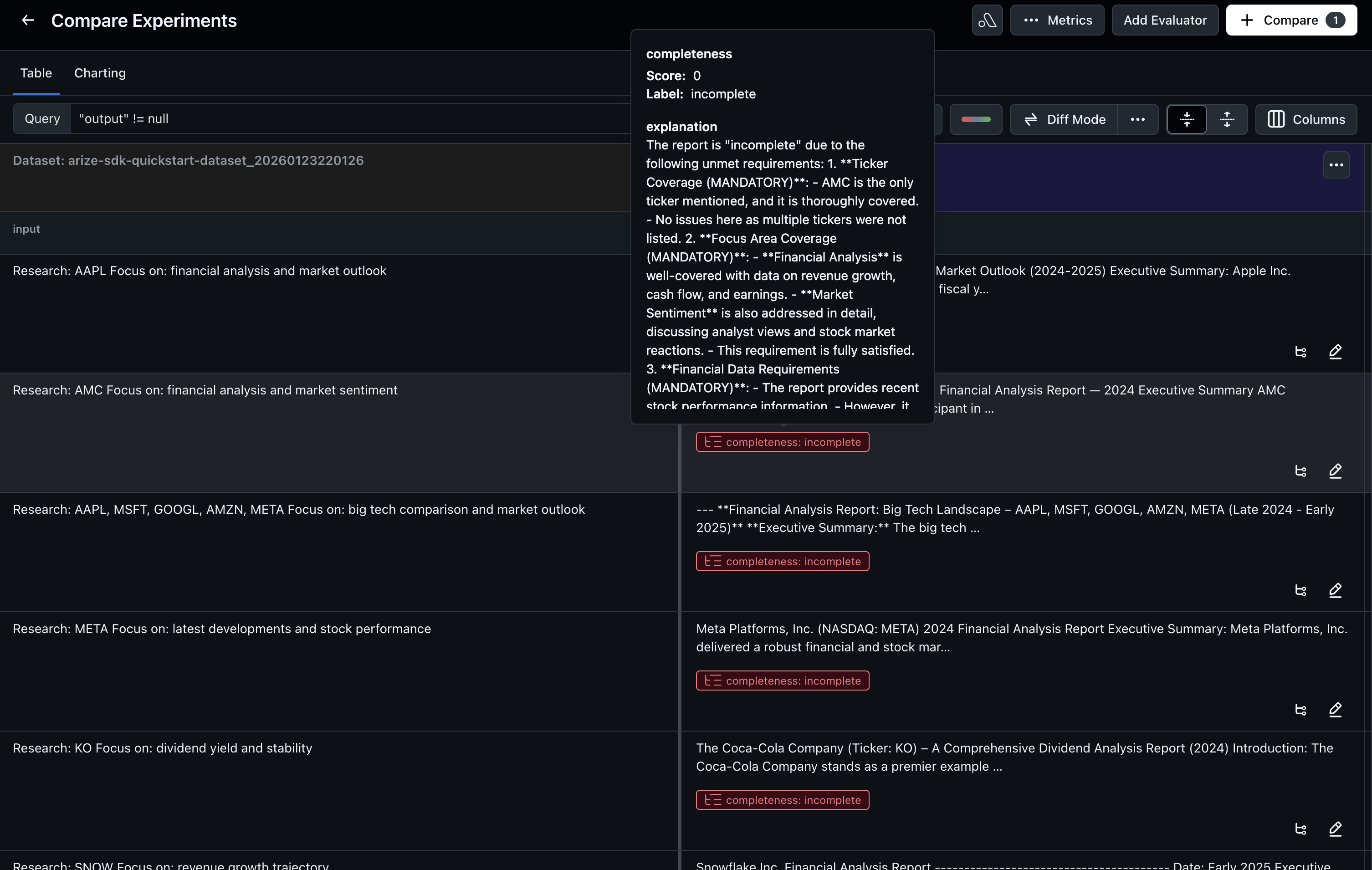
Step 4: Make Improvements
Based on the evaluation results, we’ll update the agent to address the identified issues. In this iteration, we will improve the agent’s instructions. We do this by tightening the agent goals to be more explicit about the expected output.View Improved Agent Implementation
For the complete implementation of the improved agent with updated prompts, see the notebook.
Step 5: Run the Improved Experiment
Now that we’ve created a dataset, established a baseline, and made improvements, we’ll run an experiment to test whether the changes actually improve quality. We’ll use the same task function pattern and evaluators from Step 2, but with the improved agent (updated_crew). This ensures we’re comparing apples to apples—the same evaluation criteria applied to both the baseline and improved versions.
- Automate testing — run experiments as part of CI/CD pipelines
- Compare multiple variants — test several improvements in parallel
- Analyze results in code — build custom analytics on experiment outcomes
- Track over time — see how your application improves with each iteration