

Releases · Arize-ai/phoenix
GitHub
We want to hear from you! The DevRel team wants to hear from the Phoenix community. If you’re building with Phoenix and want to tell us what’s working, what’s painful, or what you wish existed, grab 25 minutes with us.
10.16.2026: Claude Managed Agents Tracing and Gemini 4 Argon
Available in arize-phoenix 20.21.4–20.23.0Trace Claude Managed Agents sessions and Atomic Agents apps in Phoenix, test two new models in the playground, and export Phoenix server logs over OTLP.- Claude Managed Agents tracing from a Claude Console destination and the Claude SDK
- Atomic Agents tracing with the framework’s built-in OpenInference instrumentor
- Gemini 4 Argon and Meta Muse Wonder 1.0 in the playground, with built-in cost tracking
- Server log export over OTLP, correlated with server traces
- Fixes: OAuth2 sign-in during authorization flows, Bedrock tool results, and label menus
10.13.2026: Docker Sandboxes and MCP GraphQL Tools
Available in arize-phoenix 20.20.0–20.21.3, arize-phoenix-evals 3.9.1+, and @arizeai/phoenix-client 7.16.1+Run Python and TypeScript code evaluators in Docker’s hosted sandbox environment, test Claude Haiku 5.5 in the playground, and let MCP clients inspect Phoenix data through GraphQL.- Docker Sandboxes run code evaluators in Docker’s hosted sandbox environment, with optional outbound network blocking
- Claude Haiku 5.5 and Mistral pricing keep the playground and trace cost view current
- MCP GraphQL tools let agents inspect the schema, run read-only queries, and run permitted mutations on write-enabled deployments
- Analytics SQL over evaluators, prompts, trace annotations, experiment jobs, and more tables
- Evaluator fixes: metadata stays attached, and stale input mappings no longer fail runs
10.01.2026: Trace Tree Evals and Decision Spans
Available in arize-phoenix 20.17.0–20.19.0 (Python) and @arizeai/phoenix-client 7.16.0+ (TypeScript)Scan traces for failed evals before opening a span, and trace routers, classifiers, and rubric scorers as DECISION spans. arize-phoenix 20.17.0 requires Python 3.11 or newer.- Trace tree evals: annotation badges under each row, unfavorable first, with mean scores and label consensus
- DECISION spans: a dedicated icon, a detail view that names the decision model, and span-kind filters
- Project annotation configs in the TypeScript client: assign, unassign, list, and replace configs from setup scripts
- Experiment token detail charts for prompt and completion token types
- Air-gapped deployments skip the WebAssembly sandbox download and the UI’s update check
09.29.2026: Editable Dataset Examples, Trace Metrics, and Custom Skills
Available in arize-phoenix 20.13.0–20.16.0, arize-phoenix-evals 3.9.0+ and arize-phoenix-otel 0.17.2+ (Python), @arizeai/phoenix-client 7.12.0+, @arizeai/phoenix-evals 2.6.0+ and @arizeai/phoenix-cli 1.18.6+ (TypeScript)Edit a dataset’s examples right in the table, and read latency, tokens, and cost without leaving the trace tree. GraphQL callers should review the breaking changes in arize-phoenix 20.13.0.- Editable dataset examples — edit JSON cells in place, add and remove rows, and save the batch as one new version
- Trace tree metrics — latency, tokens, and cost under every row, with a hover preview breaking tokens and cost down by token type
- Mount your own skills with
PHOENIX_SKILLS_PATHS, plus GraphQL schema search and keyboard-driven slash commands in PXI - Decision-only evaluation models such as TypeSafe’s Jev in every TypeScript classification evaluator
- GPT-6 Sol, GPT-6 Luna, and Claude Opus 5.5 in the playground and the cost manifest
- TypeScript client and REST — secrets, dataset split writes, prompt version tags, filter expressions, and
sort=start_timeon the spans endpoint
09.14.2026: Coding Agent Plugins and Error Analysis
Available in arize-phoenix 20.10.0–20.12.0, arize-phoenix-evals 3.7.0+ (Python), @arizeai/phoenix-evals 2.5.0+ and @arizeai/phoenix-client 7.11.0+ (TypeScript)Install Phoenix into your coding agent with one command, and run error analysis from any agent connected to it.- Phoenix plugins for Claude Code, Codex, and Cursor — one install registers the MCP server and, in Claude Code and Cursor, the skills
- Error analysis served by Phoenix — the
/mcpendpoint loads the skill, and PXI records its open-coding notes on the entity - Completeness evaluator in both evals SDKs, with document relevance deprecated in favor of retrieval relevance
- Span cost filters —
total_costandcost_details, plus.identifieron annotation lookups - Prompt version metadata over REST, GraphQL, the TypeScript client, and the playground save dialog
- REST — filter expressions for traces and sessions, and
GET /v1/datasets/{dataset_identifier}/splits
09.08.2026: Harbor Plugin for Agent Benchmarks
Available in arize-phoenix-client 3.4.0+, with trajectory traces in 3.5.0+Benchmark agents with Harbor and the job lands in Phoenix as a dataset and one experiment per agent configuration.- A job becomes experiments, one per resolved agent and model configuration, with a run per trial
- Verifier rewards become evaluations, with
infra_okseparating a failed agent from a broken sandbox - Trajectories become traces with
trace_mode="atif", linked to the run, one session per trial - Experiment names are templated from
{job.name},{agent.name},{agent.model}, and{agent.short_digest} - Resuming is idempotent, so a re-run tops up the same experiment
09.08.2026: New Model Providers, Trace Filters, and PXI Updates
Available in arize-phoenix 20.9.0+, arize-phoenix-client 3.5.0+ (Python), @arizeai/phoenix-client 7.10.0+ (TypeScript)Three new model providers, and both SDKs can ask for just the slow failures.- Z.ai, MiniMax, and Meta built in, plus
gemini-3.8-flashandgpt-6-astra - Error and latency trace filters —
error,min_latency_ms, andmax_latency_msin both SDKs - PXI — assistant settings in five linkable tabs, and slash command suggestions in the chat input
- MCP server on FastMCP 4 and the stateless protocol
- Delete traces from a project over REST within a required time window, keeping the project
09.01.2026: GitHub Issues from PXI, PII Detection, and Client Updates
Available in arize-phoenix 20.5.0+, arize-phoenix-evals 3.6.0+ (Python), @arizeai/phoenix-evals 2.4.0+ and @arizeai/phoenix-client 7.7.1+ (TypeScript)PXI found the bug. Now it can file it. Also: an evaluator that looks for PII where leaks actually happen, and a REST gap closed for prompts.- GitHub issues from PXI — duplicate search first, approval on every write, and your own token that Phoenix never stores
- PII Detection evaluator — screens conversation records including tool calls and retrieved content, in Python and TypeScript
- Prompt versions over REST —
POST /v1/prompts/{prompt_identifier}/versionsadds and tags a version in one call - TypeScript client —
deletePrompt,transferTraces,setProjectRetentionPolicy,getCurrentUser, and session token counts - PXI browser scripts — one approval covers the whole script instead of a card per step
- Playground — Claude Fable 5.1 through Anthropic and AWS Bedrock
08.25.2026: Smarter PXI Workflows and Retrieval Evaluation
Available in arize-phoenix 20.4.0+, arize-phoenix-evals 3.5.0+ (Python), @arizeai/phoenix-evals 2.3.0+ (TypeScript)Complete multi-step Phoenix workflows with PXI, evaluate retrievals from any source, and build focused trace views faster.- PXI workflows — combine several UI actions in one turn and approve changes before Phoenix applies them
- Retrieval Relevance — score results from vector search, tools, MCP, web search, or SQL in Python and TypeScript
- Faster trace analysis — write trace filters in plain English, click a chart bin to set the time range, and compare annotations in dedicated columns
- REST administration — assign project retention policies and discover built-in or custom model providers
08.17.2026: Trace Filter Expressions and Analytics SQL
Available in arize-phoenix 20.2.0+ (analytics SQL) and 20.3.0+ (trace filters, annotation details)Filter the traces table with a full expression language, and let an agent ask Phoenix analytical questions no fixed endpoint anticipates.- Trace filter expressions — trace intrinsics, span rollups, root-span reach-through, and comprehensions over spans, annotations, and cost details, with span topology via
children,parent_span, andsiblings - Read-only analytics SQL over MCP —
describeSqlSchemapublishes the queryable schema and live indexes,executeSqlruns one bounded read-only statement - Annotation details on hover — every annotation under a name, with score, label, explanation, author, and inline filter chips
- PXI approval decisions on spans —
pxi.approval.decisionandpxi.approval.sourcemake accepted and rejected tool calls filterable
08.12.2026: Session Filter Expressions, REST API Expansion, and Endpoint Configuration
Available in arize-phoenix 19.18.0–20.1.0, arize-phoenix-client 3.0.0+ (Python), @arizeai/phoenix-client 7.4.0+, @arizeai/phoenix-otel 2.2.0+, @arizeai/phoenix-cli 1.15.0+ (TypeScript)Filter sessions the way you filter spans, manage more of Phoenix over REST, and point every SDK at one endpoint variable.- Session filter expressions — session intrinsics, per-session aggregates, and comprehensions over spans, traces, annotations, and cost details, plus plain-English AI query
- Dataset splits and experiment tags over REST — create, edit, and delete splits; assign, list, and remove dataset-scoped experiment tags including
baseline POST /v1/traces/transfer— re-parent traces into another project by trace ID or OTel trace ID- Prompt description and metadata updates from the REST API and both client SDKs
PHOENIX_ENDPOINTis the canonical API base URL across every SDK, thepxCLI, and the MCP server- OAuth2 workload identity — authenticate to an IDP with a platform-minted JWT instead of a client secret
- Breaking change —
arize-phoenix-client3.0.0 Google prompt helpers targetgoogle-genai
08.11.2026: Persistent Agent Sessions
Available in arize-phoenix 20.0.0+ (server), @arizeai/phoenix-cli 1.16.0+ and @arizeai/phoenix-client 7.5.0+ (TypeScript)Conversations with the Phoenix agent are saved server-side and shared between the browser panel and thepxi terminal client.- Browse and restore past chats, rename them, or mark one temporary so it is never saved
- Rewind or branch from any message — edit and re-send in place, or fork a new chat and leave the original alone
- Terminal session commands —
/new,/temporary,/sessions,/model, and/compact - Retention controls under Settings → Assistant for idle-chat deletion and a per-user cap
08.04.2026: Chat Completions Proxy, AI Query, and Annotation Charts
Available in arize-phoenix 19.11.0–19.17.0, @arizeai/phoenix-evals 2.2.0+ and @arizeai/phoenix-cli 1.14.0+ (TypeScript)Call any provider through Phoenix without handling its keys, write filters in plain English, and chart every annotation.- OpenAI-compatible
/v1/chat/completions— proxy chat completions (streaming included) to built-in or custom providers with credentials resolved on the server - AI Query for filter fields — describe the spans, traces, or experiment runs you want in plain English and press Enter, using on-device Browser AI or any provider Phoenix knows
- Annotation metric charts — a chart per annotation name on the project Metrics page and in the chart strip, with the three-chart selection cap lifted and charts loaded on scroll
- Conversation-grounded Hallucination evaluator — judges a response against the whole transcript, including tool results; labels change to
grounded/hallucinated - Annotations in span downloads — export evaluations alongside spans as OpenInference attributes, streamed straight to disk
- Pinned note bar in span details — press
nto take notes without leaving the trace
07.28.2026: Experiment Charts, Span Downloads, and Root-Span Filters
Available in arize-phoenix 19.5.0–19.10.0, arize-phoenix-evals 3.3.0+ (Python), @arizeai/phoenix-client 7.1.0+, @arizeai/phoenix-evals 2.1.0+, @arizeai/phoenix-otel 2.1.0+, @arizeai/phoenix-cli 1.13.0+ (TypeScript)Metric charts above the experiments table, downloadable traces, and sharper span filtering.- Experiment metric charts — pin annotation score, latency, cost, token, and error-rate charts above the experiments table, drag to reorder, and read token usage broken down by sub-type
- Download spans and traces — export a selection as OTLP JSON or JSONL, or grab a single span from its detail header
- Span-ID and root-span filtering — a
span_idfilter across the REST API, TypeScript client, andpx span list, plus aparent_span is Nonepredicate in the span filter DSL - Span detail as searchable tables — attributes, annotations, and notes as tables, with collapse-all and row clip/wrap controls
- Toxicity evaluator in both evals SDKs, the Monty local Python sandbox, and Claude Opus 5 in the Playground
- Breaking change —
@arizeai/phoenix-client7.0.0 and@arizeai/phoenix-evals2.0.0 require Vercel AI SDK v7
07.22.2026: MCP Client Setup, Provider Filtering, and User Friction Evals
Available in arize-phoenix 19.1.0+, arize-phoenix-evals 3.2.0+ (Python), @arizeai/phoenix-evals 1.2.0+ (TypeScript), @arizeai/phoenix-otel 2.0.0+MCP client setup, playground picker cleanup, a new evaluator, and AI SDK v7 tracing.- One-command MCP setup —
px setup mcpregisters the Phoenix MCP server with Claude Code, Codex, Cursor, Gemini, OpenCode, or VS Code, plus a new Settings MCP tab with per-client instructions - Provisioned-provider filtering — the playground model picker shows only providers that are ready to use
- User Friction evaluator — a built-in
friction/no_frictionclassifier in both the Python and TypeScript evals SDKs - AI SDK v7 tracing —
@arizeai/phoenix-otelupgrades to OpenInference Vercel v3 (breaking; stay on 1.x for AI SDK v6)
07.17.2026: OAuth2 Authorization Server & Remote MCP
Available in arize-phoenix 19.0.0+Phoenix becomes its own OAuth2 authorization server, so the Phoenix CLI and MCP clients log in through the browser with short-lived, user-scoped tokens instead of long-lived API keys.- OAuth2 authorization server — authorization-code + PKCE, dynamic client registration, refresh-token rotation with replay detection, a redesigned consent screen, and admin grant management
- Browser-based CLI login —
px auth login,status, andlogoutobtain and silently refresh tokens per profile - Remote MCP server (beta) — a built-in
/mcpendpoint that MCP clients (Claude Code, Cursor) connect to over OAuth - API key management — REST CRUD for user and system keys, dedicated settings tabs, and scope/audience columns
- Breaking change — GraphQL
createUserApiKey/createSystemApiKeyno longer accept API-key-authenticated callers
07.14.2026: Command Palette, Session Tools, and Table Customization
Available in arize-phoenix 17.21.0–18.0.0, arize-phoenix-client 2.13.0+ (Python), @arizeai/phoenix-config 0.3.0+ (TypeScript)Jump anywhere with the command palette, customize your tables, and script configuration from a credentials file.- Global search command palette (⌘K) — find projects, datasets, experiments, and prompts from anywhere
- Customizable data tables — pick and drag-to-reorder columns on the traces, sessions, experiments, and prompts tables
- Session tools — session stats panel, turn dividers, session-level annotation editing, and project-card session counts
.env.phoenixcredential discovery and a unifiedPHOENIX_PROJECTvariable across the SDKs- GPT 5.6 family in the Playground, plus a breaking change: session time-range filters now match on interval overlap (arize-phoenix 18.0.0)
07.07.2026: Metric Charts, Trace Search, and REST API Expansion
Available in arize-phoenix 17.15.0–17.20.0, arize-phoenix-client 2.12.0+ (Python), @arizeai/phoenix-client 6.12.0+ and @arizeai/phoenix-evals 1.1.0+ (TypeScript)Pin metric charts above your data tables, search the trace tree, and script more of Phoenix from the API and CLI.- Metric charts above tables — a resizable, per-table chart strip over spans, traces, and sessions
- Trace tree search — filter the trace tree to jump to the span you need
- Dataset labels & annotation-config assignment over REST — manage both from the API
- Classification-metric evaluators in TypeScript — precision, recall, and F-score code evaluators
px annotation-configCLI commands and Claude Sonnet 5 in the Playground
06.30.2026: PXI Terminal Client and Annotation Summary
Available in @arizeai/phoenix-cli 1.6.0+ (beta) and arize-phoenix 17.14.0+Run PXI from your shell, review annotations from project settings, and copy trace IDs from experiment trace details.- PXI terminal client — launch an interactive PXI chat with
npx -y @arizeai/phoenix-cli pxi; it connects to your Phoenix instance and runs a model preflight on startup, with/clear,/exit, and/helpslash commands in 1.6.1+ - Annotation summary — project settings list every annotation name by count for spans, traces, and sessions, with bulk delete by name
- Copyable trace IDs — the experiment trace details dialog adds a copy-to-clipboard trace ID badge
06.26.2026: Evals as Tests — pytest and Vitest/Jest Integrations
Available in arize-phoenix-client 2.10.0+ (Python) and @arizeai/phoenix-client 6.11.1+ (TypeScript, beta)Write LLM evaluations as ordinary pytest, Vitest, or Jest tests — each suite becomes a Phoenix dataset and each run a versioned experiment.- Familiar DX — mark tests with
@pytest.mark.phoenixor importdescribe/testfrom@arizeai/phoenix-client/vitest; keep fixtures, parametrization, watch mode, and.only/.skip - Debug in Phoenix — every case is traced; LLM-as-judge calls record under their own evaluator span
- Metrics beyond pass/fail — log scores, labels, and explanations and track them across experiments
- CI gates — per-case asserts plus suite-level acceptance criteria on aggregate scores
- Reuse evaluators — pre-built
arize-phoenix-evalsevaluators plug straight into a test case
06.24.2026: Annotations, Labels, and PXI Server Tools
Available in arize-phoenix 17.9.0+ through 17.11.0+A batch of annotation, label, auth, and PXI improvements rolled out across 17.9–17.11.- Trace-level annotations — trace annotation summaries appear in the trace header and project stats panel alongside span annotations
- Label management from lists — filter by label, manage labels inline, and see usage counts on the Prompts and Datasets pages, plus a prompt model column
- OAuth2 role overrides — set
ROLE_RESYNC=falseper IDP to keep manually assigned roles from being overwritten on login - PXI server bash tool — subagents gain a sandboxed
bashwithphoenix-gql, gated network access, and aPHOENIX_AGENTS_DISABLE_BASHkill switch
06.16.2026: Time Range, Metrics, and Sharing Upgrades
Available in arize-phoenix 17.5.0+ through 17.7.0+A batch of time range, project metrics, and PXI improvements rolled out across 17.5–17.7.- Calendar time range picker — choose an exact window from a two-month calendar with pan, zoom, and live streaming controls
- Shareable trace URLs — trace and session links carry the active time range so a copied link reproduces your view
- New project metrics — trace and session annotation scores plus prompt and completion token detail charts over time
- PXI subagents opt-in — a settings toggle controls the parallel data-retrieval helpers, off by default
06.11.2026: Time Range Selector — Search and Free-Form Durations
Available in arize-phoenix 17.4.0+Search the time range selector and type free-form durations to land on exactly the window you want.- Search presets — filter the preset list as you type
- Free-form durations —
25m,2h,3d, orlast 2 hourscreate custom windows on the fly - Inline editing — type start and end dates directly in the navbar selector
06.11.2026: PXI Slash Commands and Dataset Evaluator Editing
Available in arize-phoenix 17.4.0+ (PXI beta)The/ menu in PXI chat now includes local commands like /clear, and PXI can manage a dataset’s evaluators./clear— reset the conversation into a fresh session from the chat input- Dataset evaluators — PXI reads evaluator definitions, selects which run on the next playground experiment, and edits existing evaluators as accept/reject diffs
06.10.2026: PXI Skills Menu, Subagents, and Playground Orchestration
Available in arize-phoenix 17.3.0+ (PXI beta)PXI can now drive much more of Phoenix for you — invoke skills with/, fan out parallel subagents, and run full prompt-iteration loops in the playground.- Skills menu — type
/to invoke skills like/debug-traceand/llm-evaluator-authoring - Subagents — parallel, read-only data retrieval that keeps big lookups out of the main context
- Playground orchestration — load datasets, switch models, set repetitions, manage comparison instances, toggle experiment recording, and cancel runs
- Evaluator authoring and dataset management — draft LLM-judge and code evaluators, create datasets, and import spans as examples, all as reviewable diffs
06.10.2026: Claude Fable 5 in the Playground
Available in arize-phoenix 17.3.0+The playground now supports Anthropic’s Claude Fable 5 —claude-fable-5 on Anthropic and anthropic.claude-fable-5 on AWS Bedrock — with cost tracking included.Read the full update →06.02.2026: Introducing PXI
Available in arize-phoenix 17.0.0+ (beta)PXI (Phoenix Intelligence) is the AI engineering agent built into Phoenix. Hand it an investigation instead of digging through traces, prompts, and experiments yourself — it’s context-aware of the trace, prompt, filters, and project you’re working in.- Operates on your observability data — inspects traces, iterates on prompts as reviewable diffs, runs experiments, authors evaluators, and annotates spans
- Controls built in — state-changing actions require approval, everything runs on your deployment, and PXI can be disabled entirely
05.27.2026: Drag-to-Zoom on Project Metric Charts
Available in arize-phoenix 16.3.0+Click and drag across any project metric chart or the spans sparkline to zoom into a custom time window. All metric panels share the same time-range context, so one brush selection updates latency, error rate, token usage, and trace-count charts simultaneously.- All charts covered — latency, error rate, token usage, and the trace-count sparkline all support brush selection
- Adaptive tick density — x-axis labels scale with rendered pixel width, staying readable at any zoom level
05.21.2026: Code Evaluators
Available in arize-phoenix 16.0.0+Write Python or TypeScriptevaluate() functions directly in the Phoenix UI and attach them to a dataset. Phoenix runs each function in an isolated sandbox and records the output as an annotation on every experiment run — no SDK, local runtime, or deploy step required.- Local or hosted sandboxes — WebAssembly and Deno ship with Phoenix; E2B, Daytona, Vercel, and Modal add network and package support
- Versioned and traced — every save creates a new version, and each execution appears as a span
- Dry-run before saving — test the evaluator against a real dataset example from the UI
05.15.2026: OTel GenAI Semantic Convention Auto-Conversion
Available in arize-phoenix 15.10.0+Phoenix now automatically converts OTel GenAI semantic convention attributes (gen_ai.*) to OpenInference at ingest time. Traces from OpenTelemetry-native instrumentations — OpenAI, Anthropic, and Google GenAI contrib packages — now render with full message I/O, tool calls, retrieval documents, and token counts without code changes.- Zero-config — point any OTel-native instrumentation at Phoenix’s OTLP endpoint; conversion happens server-side
- OpenInference wins — spans that already carry OpenInference attributes are untouched; conversion only fills in what’s missing
- Full coverage — input/output messages, tool definitions and results, system instructions, retrieval documents, usage tokens, provider, and model name
05.15.2026: Session Trace Feedback and ATIF v1.7
Available in arize-phoenix 15.10.0+ (server), arize-phoenix-client 2.7.0+ (Python)- Session feedback toolbar — thumbs-up/down and annotate buttons appear on each turn in Session Details; clicking creates a
user_feedbacktrace annotation with toggle behavior - ATIF v1.7 trajectory upload —
upload_atif_trajectories_as_spansnow supports embedded subagent trajectories viasubagent_trajectories,trajectory_id-based deterministic span IDs for idempotent re-uploads,session_idin trajectory headers, and deterministic dispatch steps (llm_call_count: 0)
05.13.2026: Playground Thinking Controls
Available in arize-phoenix 15.8.0+The Playground now exposes first-class extended thinking controls for Anthropic and Google models, persisted with saved prompts.- Anthropic — Thinking mode (adaptive/enabled/off), token budget (min 1,024), thinking display toggle, and output effort level
- Google — Thinking budget and thinking level (LOW / MEDIUM / HIGH)
05.13.2026: Session Enhancements and Annotation Identifiers
Available in arize-phoenix 15.7.0+- Expandable session turns — long messages in Session Details are now collapsed by default with an expand/collapse toggle
- Note identifier field —
POST /v1/{trace,span,session}_notesaccepts an optionalidentifierfor upsert semantics; repeated calls with the same identifier overwrite the existing note - New CLI annotation commands —
px {trace,span,session}-annotations deletefor bulk-remove by identifier or time range,px project get <name>to fetch project metadata;--identifierflag onannotateandadd-note - Security — f-string template formatter now blocks dunder/private attribute traversal, preventing format-string injection through user-supplied variables
05.10.2026: Playground Preferences
Available in arize-phoenix 15.6.0+- Default provider and model — save a personal Playground default on the AI Providers settings page; Phoenix stores it in your browser and applies it to every new session
- Metrics aside always on — the latency/token/error metrics panel on the right side of the spans table is now visible by default, no longer gated behind a feature flag
05.08.2026: OTLP Project Routing via HTTP Header
Available in arize-phoenix 15.5.0+Set thex-project-name HTTP header on OTLP exports to route all spans in the request to a named Phoenix project. The header takes precedence over the openinference.project.name resource attribute, so tools like the OpenTelemetry Collector can route traces without modifying the instrumented application.- Works with any OTLP sender — SDK header option, Collector
headersconfig, orOTEL_EXPORTER_OTLP_HEADERSenv var - Bug fix — deleting a dataset evaluator link no longer removes the shared evaluator row (arize-phoenix 15.5.1+)
05.05.2026: Provider Tools in Playground and Prompts
Available in arize-phoenix 15.4.0+Phoenix Playground and the Prompts library now support vendor-native tools — web search, code execution, computer use, grounding, and more — alongside existing function tools. Paste any provider’s tool JSON into the Playground and Phoenix stores and round-trips it verbatim.- Generic passthrough — any tool the provider SDK accepts works without a library update; verified examples include Anthropic
web_search/code_execution/computer_use, OpenAI Responsesweb_search/file_search/code_interpreter/computer_use_preview, and Geminigoogle_searchgrounding - Mix with function tools — provider tools and function tools coexist on the same prompt version
- SDK export — Python and TypeScript clients preserve provider tools when formatting prompts
05.05.2026: REST API Updates — Annotation Delete, Token Counts, and More
Available in arize-phoenix 15.3.0–15.4.0+, arize-phoenix-evals 3.1.0+- Filter-based annotation DELETE —
DELETE /v1/projects/{project}/span_annotations,trace_annotations, andsession_annotationsbulk-remove annotations byidentifier,name,annotator_kind, or time range - Token counts in REST — trace and session list endpoints now return
cumulative_token_count_prompt,_completion, and_totalfields - Experiment CSV metadata — downloading an experiment as CSV now includes per-example dataset metadata as
metadata_<key>columns - Evals runtime capability detection — OpenAI reasoning models (
o1,o3,o3-mini,o4-mini) now work withClassificationEvaluatorautomatically
05.01.2026: TanStack AI Tracing
Available in @arizeai/openinference-tanstack-ai 0.1.0+A new OpenInference middleware for TanStack AI emitsAGENT, LLM, and TOOL spans for chat() calls — covering streaming, non-streaming, and tool-loop flows across any TanStack AI provider adapter.- Install —
npm install --save @arizeai/openinference-tanstack-ai @tanstack/ai - Usage — drop
openInferenceMiddleware()into themiddlewareoption of anychat()call - Feedback welcome — this integration is brand new; please reach out via the OpenInference repo
04.30.2026: CLI Named Auth Profiles
Available in @arizeai/phoenix-cli 1.4.0+px profile commands let you store named connection profiles — endpoint, project, API key, and headers — and switch between Phoenix instances without re-exporting environment variables. The active profile slots into the existing config resolution chain below env vars, so existing scripts are unaffected.- Commands —
px profile create,list,show,edit,use,delete - Profile status —
px auth statussurfaces the active profile name - Editor autocomplete — JSON Schema published for
~/.px/profiles.json
04.30.2026: Annotation Enhancements — Sessions, TypeScript, and Identifier Queries
Available in arize-phoenix 15.1.0+ (server), @arizeai/phoenix-cli 1.4.0+ (CLI), @arizeai/phoenix-client 6.9.0+ (TypeScript)- CLI session annotations —
px session annotate <id>andpx session add-note <id>with--include-annotations/--include-notesflags on list and get - TypeScript trace annotations —
addTraceAnnotationandlogTraceAnnotationsexported from@arizeai/phoenix-client/traces addSessionNotein@arizeai/phoenix-client/sessions- Query by identifier — GET annotation endpoints for spans, traces, and sessions accept
?identifier=to retrieve all annotations sharing a tag, project-wide
04.29.2026: Dataset Upsert
Breaking change in arize-phoenix-client 2.6.0+ (Python) and arize-phoenix 15.0.0+ (server)client.datasets.create_dataset() now defaults to upsert semantics: if a dataset with the same name exists, examples are merged into the latest version rather than returning a conflict error. Supply a stable id on each example for deterministic in-place updates on re-upload.Read the full update →04.28.2026: Session Notes API
Available in arize-phoenix 14.16.0+Phoenix now supports creating session notes throughPOST /v1/session_notes. The generic session annotation endpoint now reserves name="note" for note-specific APIs, so use POST /v1/session_notes for session notes and POST /v1/session_annotations for regular annotations.Read the full update →04.24.2026: Trace Notes API
Available in arize-phoenix 14.13.0+ (server), @arizeai/phoenix-client 6.8.0+ (TypeScript), @arizeai/phoenix-cli 1.3.0+ (CLI)Add notes to traces via the REST endpoint, TypeScript client, or CLI. Notes are stored separately from annotations and support multiple entries per trace.- TypeScript —
addTraceNote({ traceNote: { traceId, note } })from@arizeai/phoenix-client/traces - CLI —
px trace add-note <trace-id> --text "..."and--include-notesflag onpx trace get/px trace list - Reserved name —
noteis no longer accepted on the generic annotation endpoints; usePOST /v1/trace_notes
04.24.2026: arize-phoenix-otel 0.16
Available in arize-phoenix-otel 0.16.0+arize-phoenix-otel now re-exports the most common OpenInference context managers and semantic conventions, so manual instrumentation no longer requires installing openinference-instrumentation or openinference-semantic-conventions as separate dependencies.- Context managers —
using_session,using_user,using_metadata,using_tags,using_attributes,using_prompt_template,suppress_tracing(usable aswithblocks or decorators) - Semantic conventions —
SpanAttributes,OpenInferenceSpanKindValues,OpenInferenceMimeTypeValues - Single install —
pip install "arize-phoenix-otel>=0.16.0"is enough forregister()+ context propagation
04.22.2026: Secrets Settings Page
Available in arize-phoenix 14.11.0+A new Settings → Secrets page lets admins add, replace, and delete encrypted LLM provider credentials (e.g.OPENAI_API_KEY, ANTHROPIC_API_KEY) directly in the Phoenix UI — no REST API calls required.- Add / Replace / Delete secrets from the browser
- Search and filter the secrets list by key name or owner
- Admin-only — all mutations require admin access
04.22.2026: `trace_id` in Experiment Evaluators
Available in arize-phoenix-client 2.4.0+Evaluator functions now receive the originating trace ID for each experiment run. Add atrace_id keyword argument to any evaluator function or Evaluator class method to access it.- Optional — evaluators without
trace_idare unaffected - Works sync and async — supported on both function-based and protocol-based evaluators
04.20.2026: Span Attribute Filtering
Available in arize-phoenix 14.9.0+ (server), arize-phoenix-client 2.4.0+ (Python), @arizeai/phoenix-client 6.7.0+ (TypeScript)Filter spans by stored attribute values using the Python client, TypeScript client, REST API, or CLI. Multiple filters are AND-ed together; the value’s JS/Python type selects which storage type is matched.- Python —
client.spans.get_spans(..., attributes={"llm.model_name": "gpt-4o"}) - TypeScript —
getSpans({ ..., attributes: { "llm.model_name": "gpt-4o" } }) - CLI —
px span list --attribute "llm.model_name:gpt-4o" - Type-aware —
int,float,bool, andstrvalues each match their corresponding stored type
04.20.2026: CLI Span Notes
Available in @arizeai/phoenix-cli 1.1.0+px span add-note <span-id> --text "..." attaches a free-text note to any span. Pass --include-notes to px span list or px trace get to read notes back alongside span data.Read the full update →04.20.2026: Claude Opus 4.7 in the Playground
Available in arize-phoenix 14.9.0+Claude Opus 4.7 is now available as a model option in the Phoenix Playground. Select it from the model picker to compare outputs against other Anthropic and cross-provider models.Read the full update →04.16.2026: Azure Managed Identity for PostgreSQL
Available in arize-phoenix 14.8.0+Connect Phoenix to Azure Database for PostgreSQL using Microsoft Entra managed identity — no static database password required. Install theazure extra and set PHOENIX_POSTGRES_USE_AZURE_MANAGED_IDENTITY=true.- Zero-credential setup — tokens are fetched and refreshed automatically on each connection
- New
[azure]extra —pip install 'arize-phoenix[azure]'pulls inazure-identityandaiohttp PHOENIX_POSTGRES_AWS_IAM_TOKEN_LIFETIME_SECONDSdeprecated — silently ignored with a startup warning
04.14.2026: CLI Annotation Commands
Available in @arizeai/phoenix-cli 1.0.4+px span annotate and px trace annotate write labels, scores, and explanations to spans and traces from the terminal. Pass --include-annotations to px trace get or px span list to read annotations back alongside the data.px span annotate <span-id>— attach a label, score, or explanation to any span by OTel span IDpx trace annotate <trace-id>— annotate a full trace by OTel trace ID- Annotator kinds —
HUMAN,LLM, orCODE; submitting again with the same name updates the existing entry
04.13.2026: @arizeai/phoenix-otel 1.0
Available in @arizeai/phoenix-otel 1.0.0+@arizeai/phoenix-otel now re-exports the full @arizeai/openinference-core and @arizeai/openinference-semantic-conventions surface from a single import.- Tracing helpers —
withSpan,traceChain,traceAgent,traceToolwrap functions with OpenInference spans and follow global provider changes observedecorator — trace class methods with TypeScript 5+ standard decorators while preservingthis- Context setters —
setSession,setUser,setMetadata,setTags,setAttributes,setPromptTemplatepropagate attributes to child spans - Attribute builders —
getLLMAttributes,getRetrieverAttributes,getEmbeddingAttributes,getToolAttributes, and more for raw OTel spans - Semantic conventions —
SemanticConventionsandOpenInferenceSpanKindre-exported; no second dependency needed - Redaction —
OITracer+traceConfigorOPENINFERENCE_HIDE_*env vars strip sensitive attributes before export
04.10.2026: Shareable Project URLs
Available in arize-phoenix 14.2.0+Navigate to/redirects/projects/{project_name} and Phoenix resolves the name and redirects to the project page — no internal ID required. Construct stable, bookmarkable links using the project name you already set in PHOENIX_PROJECT_NAME.- Project by name —
/redirects/projects/defaultresolves and redirects to the project page - Other patterns — traces, spans, sessions, and prompt tags are also supported via
/redirects/...
04.07.2026: PostgreSQL Read Replica Routing
Available in arize-phoenix 14.0.0+Route read-only queries (GraphQL resolvers, REST reads, dataloaders) to an optional PostgreSQL read replica viaPHOENIX_SQL_DATABASE_READ_REPLICA_URL, reducing load on the primary under high span ingestion.- Set and go — point the env var at your replica; writes always go to the primary
- No config change needed when a replica is not configured — falls back to primary
04.07.2026: Breaking Changes — Phoenix v14
Breaking changes in arize-phoenix 14.0.0, arize-phoenix-evals 3.0.0, arize-phoenix-client 2.3.1+Phoenix v14 removes several legacy APIs. See the migration guide for step-by-step instructions.- CLI is now subcommand-first —
phoenix serve --devreplacesphoenix --dev serve px.Client()removed — usefrom phoenix.client import Clientwithbase_url=instead ofendpoint=/v1/evaluationsremoved — use/v1/span_annotations,/v1/trace_annotations, or/v1/document_annotations- Evals 1.0 removed —
arize-phoenix-evals3.0.0 drops thelegacy/subpackage;phoenix.experimentsis replaced byphoenix.client.experiments - GraphQL pagination requires
first—Project.spans,Trace.spans, andProjectSession.tracesnow require an explicitfirstargument (max 1000) - Resume interrupted SDK experiments — continue missing or failed runs with
resume_experimentandasync_resume_experiment
04.03.2026: ATIF Trajectory Upload
Available in arize-phoenix-client 2.3.0+ (Python)upload_atif_trajectories_as_spans converts ATIF (Agent Trajectory Interchange Format) trajectory JSON files into OpenTelemetry span trees and uploads them to Phoenix. Visualize offline Harbor agent runs alongside live instrumented traces.- Supports ATIF v1.0–v1.6 including multimodal content (images) in v1.6+
- Subagent linking — upload parent and child trajectories together to link them into one trace
- Idempotent — trace/span IDs are derived from
session_idvia SHA-256; re-uploading the same file is safe
04.01.2026: Python 3.14 Support
Available in arize-phoenix 13.21.0+, arize-phoenix-client 2.2.0+, arize-phoenix-evals 2.13.0+Phoenix server, Python client SDK, and evals library now support Python 3.14 on Linux and macOS.Read the full update →04.01.2026: Secrets Management REST API
Available in arize-phoenix 13.21.0+Admin users can store encrypted LLM provider API keys in Phoenix viaPUT /v1/secrets. Atomically upsert or delete multiple secrets in one request; values are AES-encrypted at rest and never returned in responses.PUT /v1/secrets— batch upsert/delete withvalue: nullto remove a key- Admin-only, atomic, silent no-op for deleting non-existent keys
04.01.2026: `get_traces` — Retrieve Traces via Python SDK
Available in arize-phoenix 13.15.0+ (server), arize-phoenix-client 2.2.0+ (Python)client.traces.get_traces() fetches traces for a project with time range filtering, session filtering, sort control, and automatic cursor-based pagination.include_spans=Trueto embed full span detail in each tracesession_idto filter to one or more sessions- Async variant available on
AsyncClient
03.30.2026: Delete Prompts and Prompt Version Tags
Available in arize-phoenix 13.20.0+Two new REST endpoints let you delete prompts and remove tags from prompt versions programmatically.DELETE /v1/prompts/{prompt_identifier}— permanently deletes a prompt and all its versions, tags, and labelsDELETE /v1/prompt_versions/{id}/tags/{tag_name}— removes a single tag from a specific prompt version
03.24.2026: Prompt Version Diff View
Available in arize-phoenix 13.18.0+The Prompts UI now shows a line-by-line diff between any two prompt versions. See exactly what changed — message content, tool call arguments, and tool results — without leaving Phoenix.- Side-by-side diff across the full chat template, including all content part types
03.24.2026: Evals Accept Structured Data Inputs
Available in arize-phoenix-evals 2.12.0+Evaluators now accept dicts and lists as template variable values, JSON-serializing them automatically. Built-in evaluators also accept**kwargs forwarded to the LLM on every call (e.g., temperature=0.0).- Structured inputs (dicts, lists) are JSON-serialized before prompt rendering — no manual
json.dumps()needed - LLM invocation kwargs accepted by all built-in evaluators (
FaithfulnessEvaluator,CorrectnessEvaluator, etc.)
03.23.2026: `px auth status` Shows Username and Role
Available in arize-phoenix 13.17.0+ and @arizeai/phoenix-cli 0.12.0+px auth status now verifies credentials against the server and displays the authenticated username and role alongside the endpoint and token info.Read the full update →03.22.2026: `px spans` — Fetch and Filter Spans from the CLI
Available in arize-phoenix 13.16.0+ and @arizeai/phoenix-cli 0.12.0+px spans fetches spans for a project with filtering by kind, status code, name, trace ID, and time window. Output to the terminal or save to JSON for offline use.--span-kind,--status-code,--name,--trace-idfilters--last-n-minutes/--sincetime range controls--include-annotationsto attach span annotations to the output
03.22.2026: `px self update` and `GET /v1/user`
Available in arize-phoenix 13.16.0+ and @arizeai/phoenix-cli 0.12.0+px self update upgrades the installed CLI to the latest version, detecting npm, pnpm, bun, or Deno automatically. GET /v1/user returns the authenticated user’s profile (username, email, role) or an anonymous representation when auth is disabled.Read the full update →03.18.2026: Span Filters — Name, Kind, and Status Code
Available in arize-phoenix 13.15.0+ (server), arize-phoenix-client 2.1.0+ (Python), @arizeai/phoenix-client 6.5.1+ (TypeScript)Filter spans directly by name, span kind (LLM, CHAIN, TOOL, etc.), and status code (OK, ERROR, UNSET) in both the REST API and SDK clients. Filters are OR-combined within a field and AND-combined across fields.namefilter to match one or more span namesspan_kindfilter forLLM,CHAIN,TOOL,RETRIEVER, and other span kindsstatus_codefilter to isolate error, success, or unset spans- Available in Python via
client.spans.get_spans(name=..., span_kind=..., status_code=...) - Available in TypeScript via
getSpans({ name, spanKind, statusCode })
03.13.2026: List Traces by Project
Available in arize-phoenix 13.15.0+A newGET /v1/projects/{project_identifier}/traces REST endpoint lists traces with time filtering, sort order, cursor pagination, optional inline spans, and session filtering.GET /v1/projects/{project}/traceswithsort,order,limit,cursor,include_spans, andsession_identifierparams
03.11.2026: Session Turns API
Available in arize-phoenix-client 2.0.0+ (Python) and @arizeai/phoenix-client 6.4.0+ (TypeScript)Phoenix now provides a dedicated session turns API that reconstructs the ordered input/output pairs across all traces in a session. The newget_session_turns() method (Python) and getSessionTurns() function (TypeScript) extract root span input.value / output.value attributes and return chronologically ordered SessionTurn objects.- Chronological turn ordering from session traces sorted by start time
SessionTurnIOwith MIME type — supportstext/plain,application/json, and image types- Batched root span fetching with pagination to handle large sessions
- Async variants available in both Python and TypeScript clients
03.10.2026: Session Management REST APIs
Available in arize-phoenix 13.13.0+ (server), arize-phoenix-client 1.31.0+ (Python), @arizeai/phoenix-client 6.1.0+ (TypeScript)Phoenix now exposes comprehensive session management through REST API endpoints on the server. Retrieve individual sessions, list sessions with pagination and project filtering, and delete sessions with cascading cleanup of associated traces, spans, and annotations.- Single session retrieval by ID or GlobalID with optional project filtering
- Bulk session listing with pagination, project filtering, and sorting
- Session deletion with automatic cascade through traces and spans
- DataFrame export in Python for sessions data analysis
- Configurable timeouts for all session operations
03.09.2026: Filter Spans by Trace ID and Parent Relationships
Available in arize-phoenix 13.12.0+ (server), arize-phoenix-client 2.0.0+ (Python), @arizeai/phoenix-client 6.3.0+ (TypeScript)Span queries now support filtering by trace ID and parent relationships, enabling precise navigation of trace hierarchies. Query for root spans usingparent_id=null or retrieve all children of a specific parent span to reconstruct execution trees programmatically.- Trace ID filtering to retrieve spans from specific traces
- Parent ID filtering to query root spans or span children
- Multi-trace queries via repeated trace ID parameters
- Composable with existing filters like time ranges and limits
03.04.2026: Incremental Evaluation Metrics in Playground
Available in arize-phoenix 13.8.0+The Playground now displays evaluation metrics, cost, and latency aggregates in real-time as dataset experiments run. Metrics update incrementally every ~2 seconds, providing immediate feedback on experiment performance without waiting for completion.Read the full update →03.04.2026: Brute Force Login Protection
Available in arize-phoenix 13.8.0+Phoenix now automatically protects login endpoints against brute force attacks. After 5 consecutive failed attempts, the account is temporarily locked for 5 minutes. Enabled by default with configurable thresholds viaPHOENIX_BRUTE_FORCE_LOGIN_PROTECTION_MAX_ATTEMPTS.Read the full update →03.07.2026: Unified Dataset Upload with Drag-and-Drop
Available in arize-phoenix 13.9.0+Dataset creation from files is now streamlined with automatic file type detection and a unified upload experience. Drag-and-drop CSV or JSONL files anywhere in the upload form, and Phoenix automatically parses headers and previews data without loading entire files into memory.- Automatic format detection for CSV and JSONL files
- Drag-and-drop file selection with visual feedback
- Streaming parser that handles large files efficiently
- RFC 4180 CSV support including quoted fields, escaped quotes, and BOM handling
- Detailed error messages for parsing issues with line-by-line feedback
03.10.2026: Drag-and-Drop Column Assignment for Datasets
Available in arize-phoenix 13.13.0+Dataset creation now features an intuitive drag-and-drop column assignment interface. Assign columns to input, output, or metadata buckets with automatic suggestions based on common naming conventions, and preview exactly how your data will appear in the final dataset.- Visual column assignment with draggable chips and drop targets
- Smart auto-assignment based on column names like “input”, “output”, “reference”
- Live dataset preview showing the final structure as you make changes
- Keyboard navigation support for accessibility
- Raw data preview in tabular format alongside final dataset view
03.08.2026: Extended Model Provider Support
Available in arize-phoenix 13.10.0+ (Cerebras, Fireworks, Groq, Moonshot) and arize-phoenix 13.11.0+ (Perplexity, Together AI)Phoenix Playground now supports six additional OpenAI-compatible model providers: Perplexity AI, Together AI, Cerebras, Fireworks AI, Groq, and Moonshot (Kimi). Access hundreds of new models including specialized reasoning models and fine-tuned variants through familiar OpenAI-compatible APIs.- Perplexity AI for research and web-grounded responses
- Together AI with models from Moonshot, DeepSeek, Qwen, and GLM
- Cerebras for ultra-fast inference with Llama models
- Fireworks AI with Llama 4 Scout and Maverick variants
- Groq for low-latency Llama and Qwen deployments
- Moonshot (Kimi) with extended 128k and 32k context models
- Cost tracking enabled for Cerebras, Fireworks, Groq, and Moonshot
03.10.2026: Provider Visibility Controls
Available in arize-phoenix 13.13.0+Control which model providers appear in the Phoenix UI using thePHOENIX_ALLOWED_PROVIDERS environment variable. Set it to a comma-separated list of provider names to show only those providers, keeping your interface focused on the tools you actually use.- Allow-list mode to show only specified providers
- Case-insensitive configuration with typo detection warnings
- Set to NONE to hide all providers from the UI
03.08.2026: Latest OpenAI GPT Models
Available in arize-phoenix 13.10.0+Phoenix Playground now includes the latest OpenAI models: GPT-5.4 family, GPT-5.3-chat-latest, GPT-5.2-pro variants, and o3-pro-2025-06-10. All models include cost tracking and are ready to use in experiments and prompt testing.Read the full update →03.08.2026: Project Editing from Settings
Available in arize-phoenix 13.10.0+Edit project descriptions and customize gradient colors directly from the Project Settings page. Click the edit button to update project metadata inline, with changes persisting immediately across the Phoenix UI.Read the full update →03.11.2026: Breaking Change: Removed Deprecated Annotations API
Breaking change in arize-phoenix-client 2.0.0The deprecatedclient.annotations module has been removed. All annotation methods remain available on client.spans. Update your code to use client.spans.add_span_annotation() and client.spans.log_span_annotations() instead of the client.annotations variants.Read the full update →03.05.2026: SDK Session Retrieval
Session retrieval is now available in the Python client (client.sessions.get(), client.sessions.list(), get_sessions_dataframe()) and the TypeScript client (getSession(), listSessions()). Both SDKs support automatic pagination and async usage for working with session turns data.Read the full update →02.27.2026: Sessions API and CLI Support
REST API endpoints for listing and getting sessions (GET /v1/sessions, GET /v1/sessions/{id}) and CLI commands (px sessions, px session <id>) for exploring multi-turn conversations from the terminal.Read the full update →02.24.2026: Claude Agent SDK Integration
Phoenix now supports tracing for Anthropic’s Claude Agent SDK via a new OpenInference instrumentation package. The integration automatically captures AGENT and TOOL spans, giving you full visibility into your Claude Agent SDK applications.- Install
@arizeai/openinference-instrumentation-claude-agent-sdkalongside@arizeai/phoenix-otel - See agent execution flows and tool invocations in Phoenix’s trace UI
- Get started →
02.14.2026: Phoenix 13.0
Phoenix 13.0 is a major release centered on Dataset Evaluators, with support for custom model providers, OpenAI Responses API type selection, and extensive Playground and dataset/experiment UX improvements.Highlights include:- Attach evaluator suites directly to datasets and run them server-side on every Playground experiment.
- Reuse server-managed custom providers (OpenAI, Azure OpenAI, Anthropic, AWS Bedrock, Google GenAI) across Playground, prompts, and dataset evaluators.
- Choose OpenAI API type per configuration (
chat.completions.createorresponses.create) with automatic parameter compatibility handling. - Use new Playground workflows such as cancellation, template variable autocomplete, appended messages, improved prompt selection, and URL state for prompt IDs/versions/tags.
- Get expanded dataset and experiment ergonomics, model/provider updates (including Claude Opus 4.6 and Azure OpenAI v1 migration), and infrastructure improvements like a session ID index for spans.
02.12.2026: OpenAI Responses API Type Support
Phoenix now supports selecting the OpenAI API type for OpenAI and Azure OpenAI calls in the Playground and custom providers. Choose Chat Completions (chat.completions.create) or Responses (responses.create) depending on the model and features you want to use.Key capabilities:- API type selection: Choose Chat Completions or Responses per model configuration.
- Custom provider support: OpenAI and Azure OpenAI custom providers can be configured with an API type for consistent routing.
- Parameter compatibility: Phoenix maps shared invocation parameters to the chosen API type and filters unsupported fields automatically.
02.12.2026: Dataset Evaluators
Requires Phoenix 13.x. Dataset evaluators let you attach evaluators directly to a dataset so they automatically run server-side whenever you execute experiments from the Phoenix UI (for example, from the Playground). This turns your dataset into a reusable evaluation suite and removes the need to reconfigure evaluators for every experiment.Key capabilities:- Attach once, evaluate everywhere: Add LLM or built-in code evaluators to a dataset and reuse them across Playground experiments.
- Flexible input mapping: Map evaluator inputs to dataset fields so each example is evaluated consistently.
- Built-in visibility: Each evaluator captures traces for debugging and refinement, with details available from the evaluator view.
02.11.2026: Custom Providers for Playground and Prompts
Phoenix now supports custom providers for OpenAI, Azure OpenAI, Anthropic, AWS Bedrock, and Google GenAI. Custom providers let you store provider credentials and routing configuration on the server and reuse them across the playground and saved prompt versions.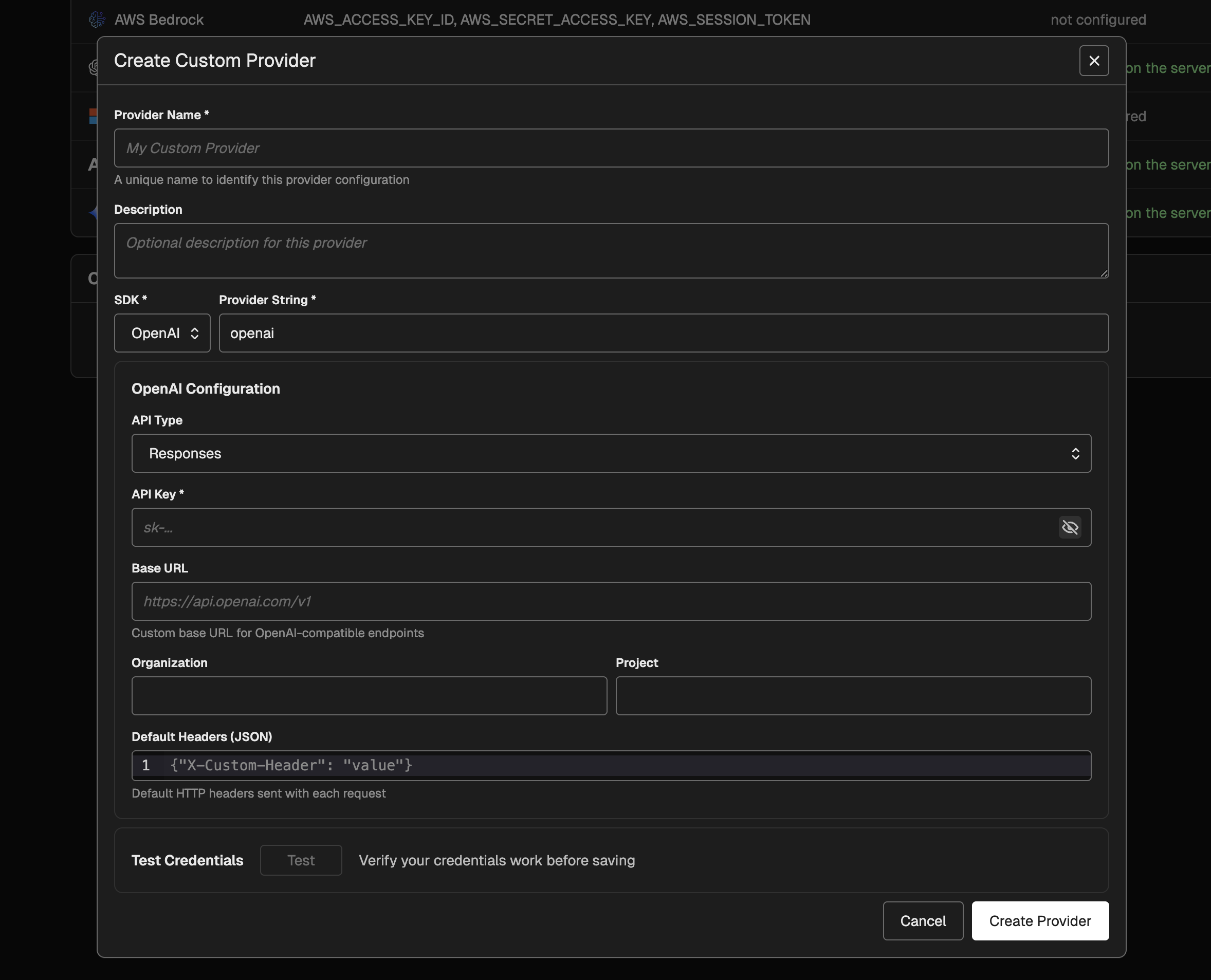 Key capabilities:
- Centralized configuration: Manage provider credentials and routing in Settings and reuse them across the playground and prompt versions.
- SDK-specific authentication: Support API keys, Azure AD token providers, or default credentials (Azure/AWS) depending on the SDK.
- Model selection integration: Custom providers show up in model menus as their own provider group and inherit model listings from the underlying SDK.
- Request-level overrides: Continue to supply custom request headers per prompt while using custom provider configuration for routing and authentication.
02.09.2026: Claude Opus 4.6 Model Support
Phoenix playground now supports Claude Opus 4.6, Anthropic’s latest flagship model. Selectclaude-opus-4-6 in the Anthropic provider or anthropic.claude-opus-4-6-v1 in AWS Bedrock to start using the model with full extended thinking parameter support and accurate cost tracking.Key capabilities:- Anthropic provider integration: Access Claude Opus 4.6 directly through the playground with the
thinkinginvocation parameter enabled for extended reasoning workflows - AWS Bedrock support: Deploy Opus 4.6 through Bedrock with the region-specific model identifier
- Automatic cost tracking: Token costs are calculated using the latest pricing ($5 per million input tokens, $25 per million output tokens, plus cache read/write rates)
01.31.2026: Tool Selection and Tool Invocation Evaluators
Available in arize-phoenix-evals 0.16.0+ (Python) and @arizeai/phoenix-evals 1.3.0+ (TypeScript)Phoenix now provides two specialized evaluators for assessing AI agent tool usage. The Tool Selection Evaluator judges whether an agent correctly chose the most appropriate tool from its available toolkit to answer a user’s question, without evaluating the parameters passed. The Tool Invocation Evaluator assesses whether the agent correctly invoked a tool with proper parameters, JSON formatting, and safe values.These evaluators help developers:- Identify tool selection errors where agents choose suboptimal or incorrect tools
- Debug parameter issues including hallucinated fields, malformed JSON, and incorrect values
- Improve tool descriptions and agent prompts based on systematic evaluation
- Validate multi-tool and multi-turn interactions across complex agent workflows
ToolSelectionEvaluator and ToolInvocationEvaluator in Python’s phoenix.evals.metrics module, and as createToolSelectionEvaluator and createToolInvocationEvaluator in TypeScript.Read the full update →01.28.2026: Configurable Email Extraction for OAuth2 Providers
Available in Phoenix 12.33.1+Phoenix now supports custom email extraction from OAuth2 identity providers through thePHOENIX_OAUTH2_{IDP}_EMAIL_ATTRIBUTE_PATH environment variable. This solves authentication issues with providers like Azure AD/Entra ID where the standard email claim may be null but alternative claims like preferred_username contain the user’s identity.Configure email extraction using JMESPath expressions:email claim when no custom path is specified. JMESPath expressions are validated at startup for immediate feedback on configuration errors.Read the full update →01.22.2026: CLI Commands for Prompts, Datasets, and Experiments
Available in @arizeai/phoenix-cli 0.4.0+The Phoenix CLI now provides comprehensive commands for managing prompts, datasets, and experiments directly from your terminal. Access version-controlled prompts, create evaluation datasets, and run experiments—all without leaving your development environment.Prompt Management:- List and view prompts with
px promptsandpx prompt <name> - Pipe prompts to AI assistants for optimization and analysis
- Text format output with XML-style role tags for LLM consumption
- Create and manage datasets with
px datasetsandpx dataset <name> - Add examples and query dataset contents
- Export datasets for offline analysis
- Run experiments and compare results across configurations
- View experiment details and performance metrics
- Track changes across prompt and model variations
01.23.2026: CLI Authentication Configuration
Available in @arizeai/phoenix-cli 0.4.0+The Phoenix CLI now includes enhanced authentication configuration commands, resolving database race conditions and improving connection reliability. Users can configure authentication settings directly through the CLI for more predictable and stable connections to Phoenix servers.Read the full update →01.21.2026: Create Datasets from Traces with Span Associations
Available in arize-phoenix-client 1.28.0+ (Python) and @arizeai/phoenix-client 2.0.0+ (TypeScript)Phoenix now enables converting production traces into curated datasets while preserving bidirectional links back to source spans. Use the newspan_id_key parameter to maintain traceability from evaluation examples to their original production executions.Python Example:- Batch resolution of span IDs for optimal performance
- Graceful fallback when span IDs are missing or invalid
- Backwards compatible with existing dataset creation workflows
- Bidirectional navigation between evaluation results and production traces
01.19.2026: Export Annotations with Traces
Available in @arizeai/phoenix-cli 0.3.0+The Phoenix CLI now supports exporting annotations alongside traces using the--include-annotations flag. Annotations—including manual labels, LLM evaluation scores, and programmatic feedback—are now preserved when exporting traces for offline analysis, backup, or migration workflows.01.22.2026: CLI Prompt Commands: Pipe Prompts to AI Assistants
📝Available in @arizeai/phoenix-cli 0.4.0+Phoenix CLI now supports prompt introspection withpx prompts and px prompt. List prompts, view their content, and pipe them directly to AI assistants like Claude Code for optimization suggestions. The --format text option outputs prompts with XML-style role tags, ideal for analysis workflows.Read the full update →01.21.2026: Create Datasets from Traces with Span Associations
🔗Available in arize-phoenix-client 1.28.0+ (Python) and @arizeai/phoenix-client 2.0.0+ (TypeScript)The Phoenix client now enables converting production traces into curated datasets while preserving associations back to source spans. Query spans using client methods, then create datasets with span associations to maintain bidirectional links. Use this to build golden datasets from validated interactions, curate edge cases from failed traces, or create regression test suites from critical user flows.Read the full update →01.21.2026: Phoenix CLI: Datasets, Experiments & Annotations
🧪Available in @arizeai/phoenix-cli 0.2.0+The Phoenix CLI now supports datasets, experiments, and annotations. Pull evaluation data, export experiment results, and access human feedback directly from the terminal. Works well with AI coding assistants for analyzing test cases and reviewing results.Read the full update →01.17.2026: Phoenix CLI: Terminal Access for AI Coding Assistants
🖥️Available in @arizeai/phoenix-cli 0.1.0+AI coding assistants operate through terminals and files—they run shell commands, read output, and process data. The new Phoenix CLI makes trace data accessible through these interfaces, enabling tools like Claude Code, Cursor, and Windsurf to query your Phoenix instance directly. Export traces to JSON, pipe tojq, or save to disk for analysis.Read the full update →01.05.2026: Appended Messages for Playground Experiments
💬Available in Phoenix 13.0+The Prompt Playground now supports appending conversation history from dataset examples to your prompts. This enables powerful A/B testing workflows for comparing models and system prompts against the same conversation threads. Specify a dot-notation path to messages in your dataset (e.g.,messages or input.messages) and run experiments across all prompt variants.Read the full update →12.20.2025: Improved User Preferences
⚙️Available in Phoenix 12.27+Phoenix now offers enhanced user preference settings, giving you more control over your experience. This update includes theme selection in viewer preferences and programming language preference.Read the full update →12.12.2025: Support for Gemini Tool Calls
🤖Available in Phoenix 12.25+Phoenix now supports Gemini tool calls, enabling enhanced integration capabilities with Google’s Gemini models. This update allows for more robust and feature-complete interactions with Gemini, including improved request/response translation and advanced conversation handling with tool calls.Read the full update →12.09.2025: Span Notes API
📝Available in Phoenix 12.21+New dedicated endpoints for span notes enable open coding and seamless annotation integrations. Add notes to spans programmatically using the Phoenix client in both Python and TypeScript—perfect for debugging sessions, human feedback, and building custom annotation pipelines.Read the full update →12.06.2025: LDAP Authentication Support
🔐Available in Phoenix 12.20+Phoenix now supports authentication against LDAP directories, enabling integration with enterprise identity infrastructure including Microsoft Active Directory, OpenLDAP, and any LDAP v3 compliant directory. Key features include group-based role mapping, multi-server failover, TLS encryption, and automatic user provisioning.Read the full update →12.04.2025: Evaluator Message Formats
💬Available in phoenix-evals 0.22+ (Python) and @arizeai/phoenix-evals 2.0+ (TypeScript)Phoenix evaluators now support flexible prompt formats including simple string templates and OpenAI-style message arrays for multi-turn prompts. Python supports both f-string and mustache syntax, while TypeScript uses mustache syntax. Adapters handle provider-specific transformations automatically.Read the full update →12.03.2025: TypeScript createEvaluator
🧪Available in @arizeai/phoenix-evals 2.0+ThecreateEvaluator utility provides a type-safe way to build custom code evaluators for experiments in TypeScript. Define evaluators with full type inference, access input, output, expected, and metadata parameters, and integrate seamlessly with runExperiment.Read the full update →12.01.2025: Splits on Experiments Table
📊Available in Phoenix 12.20+You can now view and filter experiment results by data splits directly in the experiments table. This enhancement makes it easier to analyze performance across different data subsets (such as train, validation, and test) and compare how your models perform on each split.Read the full update →11.29.2025: Add support for Claude Opus 4-5
🤖Available in Phoenix 12.18+
11.27.2025: Show Server Credential Setup in Playground API Keys
🔐Available in Phoenix 12.18+
11.25.2025: Split Assignments When Uploading a Dataset
🗂️Available in Phoenix 12.18+11.23.2025: Repetitions for Manual Playground Invocations
🛝Available in Phoenix 12.17+
11.14.2025: Expanded Provider Support with OpenAI 5.1 + Gemini 3
🔧Available in Phoenix 12.15+This update enhances LLM provider support by adding OpenAI v5.1 compatibility (including reasoning capabilities), expanding support for Google DeepMind/Gemini models, and introducing the gemini-3 model variant.Read the full update →11.12.2025: Updated Anthropic Model List
🧠Available in Phoenix 12.15+This update enhances the Anthropic model registrations in Arize Phoenix by adding support for the 4.5 Sonnet/Haiku variants and removing several legacy 3.x Sonnet/Opus entries.Read the full update →11.09.2025: OpenInference TypeScript 2.0
💻
- Added easy manual instrumentation with the same decorators, wrappers, and attribute helpers found in the Python
openinference-instrumentationpackage. - Introduced function tracing utilities that automatically create spans for sync/async function execution, including specialized wrappers for chains, agents, and tools.
- Added decorator-based method tracing, enabling automatic span creation on class methods via the
@observedecorator. - Expanded attribute helper utilities for standardized OpenTelemetry metadata creation, including helpers for inputs/outputs, LLM operations, embeddings, retrievers, and tool definitions.
- Overall, tracing workflows, agent behavior, and external tool calls is now significantly simpler and more consistent across languages.
11.07.2025: Timezone Preference
🌍Available in Phoenix 12.11+
11.05.2025: Metadata for Prompts
🗂️Available in Phoenix 12.10+
metadata field for prompts.Read the full update →11.03.2025: Playground Dataset Label Display
🏷️Available in Phoenix 12.10+
11.01.2025: Resume Experiments and Evaluations
🔄Available in Phoenix 12.10+This release allows you to resume your experiments and evaluations at your convenience. If certain examples fail, there is no need to repeat an entire task you already completed. This feature provides you with new management capabilities across servers and clients. It’s designed to save effort, making your experimentation workflow more flexible.Read the full update →10.30.2025: Metadata Support for Experiment Run Annotations
🧩Available in Phoenix 12.9+
10.28.2025: Enable AWS IAM Auth for DB Configuration
🔐Available in Phoenix 12.9+Added support for AWS IAM–based authentication for PostgreSQL connections to AWS Aurora and RDS. This enhancement enables the use of short-lived IAM tokens instead of static passwords, improving security and compliance for database access.Read the full update →10.26.2025: Add Split Edit Menu to Examples
䷖Available in Phoenix 12.8+
10.24.2025: Filter Prompts Page by Label
🏷️Available in Phoenix 12.7+
10.20.2025: Splits
䷖Available in Phoenix 12.7+In Arize Phoenix, splits let you categorize your dataset into distinct subsets—such as train, validation, or test—enabling structured workflows for experiments and evaluations. This capability offers more flexibility in how you organize, filter, and compare your data across different stages or experimental conditions.Read the full update →10.18.2025: Filter Annotations in Compare Experiments Slideover
✍️Available in Phoenix 12.7+
10.15.2025: Enhanced Filtering for Examples Table
🔍Available in Phoenix 12.5+
10.13.2025: View Traces in Compare Experiments
🧪Available in Phoenix 12.5+
10.10.2025: Viewer Role
👀Available in Phoenix 12.5+Introduced a new VIEWER role with enforced read-only permissions across both GraphQL and REST APIs, improving access control and security.Read the full update →10.08.2025: Dataset Labels
🏷️Available in Phoenix 12.3+
10.06.2025: Paginate Compare Experiments
📃Available in Phoenix 12.3+
10.05.2025: Load Prompt by Tag into Playground
🛝Available in Phoenix 12.2+
10.03.2025: Prompt Version Editing in Playground
🛝Available in Phoenix 12.2+
09.29.2025: Day 0 support for Claude Sonnet 4.5
⚡Available in Phoenix 12.1+09.27.2025: Dataset Splits
📊Available in Phoenix 12.0+Add support for custom dataset splits to organize examples by category.Read the full update →09.26.2025: Session Annotations 🗂️
Available in Phoenix 12.0+
09.25.2025: Repetitions
🔁Available in Phoenix 11.38+09.24.2025: Custom HTTP headers for requests in Playground
🛠️Available in Phoenix 11.36+
09.23.2025: Repetitions in experiment compare slideover
🔄Available in Phoenix 11.36+09.22.2025: Helm configurable image registry & IPv6 support
🌐Available in Phoenix 11.35+Read the full update →09.17.2025: Experiment compare details slideover in list view
🔍Available in Phoenix 11.34+09.15.2025: Prompt Labels 🏷️
Available in Phoenix 11.33+09.12.2025: Enable Paging in Experiment Compare Details 📄
Available in Phoenix 11.33+J / K). PaginationRead the full update →See more
2026